Activity
Mon
Wed
Fri
Sun
Jul
Aug
Sep
Oct
Nov
Dec
Jan
Feb
Mar
Apr
May
What is this?
Less
More
Memberships
The Limitless Trading Club
182 members • Free
AI Automation Society
387.1k members • Free
DamoBird365 - Agents & Flows
402 members • Free
Learn Power Apps
2.6k members • Free
TikTok Shop Mastery
2k members • Free
13 contributions to Learn Power Apps

28d •
I've never felt this much behind as a programmer...
If someone like Andrj Karpathy feels behind, imagine where us mere mortals find ourselves?


1 like • 26d
Everything is moving so fast 😞
Sep '24 •
🔥 Early bird discount ending soon! I 5-Day Bootcamp 🪖
Are you struggling to reach your Power Apps project deadline or been asked to develop an app by your boss but you don’t know where to start, and you don’t have enough guidance, the right resources and time? I know what you’re going through, and I want to share my expertise with you. 🚀 That’s why I’m excited to announce that we’ll be having a 5-Day Virtual Power Apps Bootcamp happening from September 23 - September 27, 2024, and I’d love for you to join me! 🧑🚀 ⬇️ Click here to learn more about this LIVE 5-day Power Apps Virtual Bootcamp - https://go.superpowerlabs.co/superbootcampregpage This 5-day LIVE bootcamp is perfect for anyone who’s new to Power Apps or those looking to strengthen their understanding of the basics and we will be going over some light intermediate topics as the week progresses. It's going to be a great hands-on learning experience designed to help you confidently build your own Power Apps by the end of the week. 🗓️ BOOTCAMP DETAILS: When: September 23 - September 27, 2024 I 9am-4pm (EST) Where: Zoom 🟦 Perfect for: Beginners in Power Apps or those wanting a strong foundation Bonuses you’ll get when you enroll in our Bootcamp: - The Ultimate JumpStart Kit ($97 value) - Ticketing System ($497 value) - Personal Pocket Coaching ($365 value) - Free 1 hour 1-on-1 tutoring session with me ($250/hr. value) Click here to learn more about this LIVE 5-day Power Apps Virtual Bootcamp - https://go.superpowerlabs.co/superbootcampregpage Let’s make magic happen! -Darren Neese the “Power Apps Wizard”
2 likes • Sep '24
Thanks Darren - just grabbed this. Apologies that I won't be there in person but I would love to join a live one towards the end of the year, if not at the start of the new year. 😊
Jul '24 •
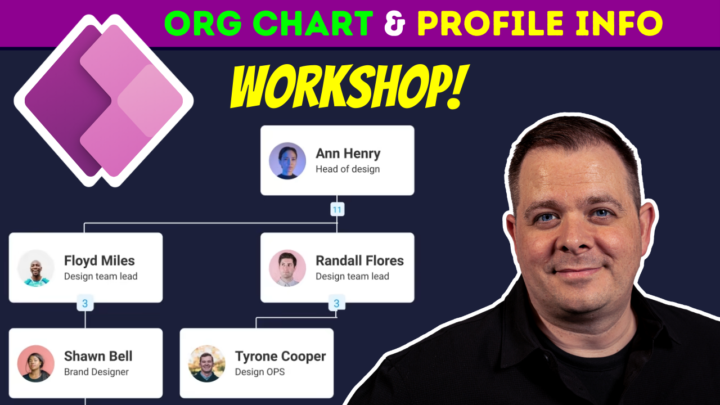
Today's Workshop (Vol. 18): Org Chart & Profile Info
Do you need to create an Org Chart App. Perhaps you need to add a feature to your application that allows users to update their M365 profile information. What about saving User preferences? That's what we'll be covering in today's workshop! Here is the link to this $25/mo full-access membership: https://www.skool.com/power-platform-workshops CALL TO ACTION: Who's going to sign up today?! Comment below with the one topic you really want us to do a workshop on! 🤠👍 If you want to get access to my courses, here is the lowest price I can offer this weekend only! 👍👍 🎈🎉https://www.skool.com/power-apps-community/independence-weekend-special-offer🟥⬜🟦 🔴 NOTE: You guys might be interested in this other Skool community I started where we are building a new Power Apps (JumpStart Kit) template that is driven by you guys' feedback! - https://www.skool.com/power-apps-templates
1 like • Jul '24
What time does this workshop start? Has it already?

Apr '24 •
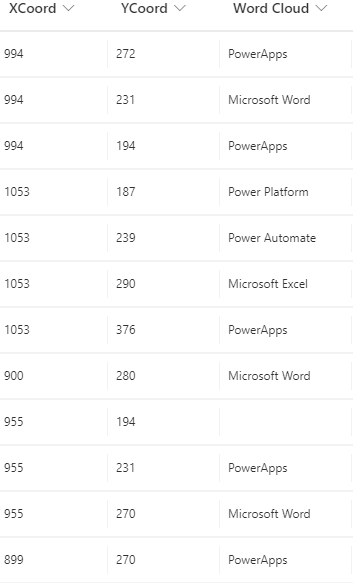
Word Cloud Concept
In the workshop today (16 April) we talked about a word cloud. I gave a small description on how you could possibly do it, but wanted to get some additional thoughts, because it was an amazing idea. My basic thoughts for beginner word cloud concept is this. Create a gallery that expands the size of the screen you want it. In this case I am pulling from another app I have built so its a full screen gallery. I currently have an SharePoint list where I have three main columns (XCoord, YCoord, and Word Cloud). I currently have the XCoord and YCoord manually set, but this is where this groups hive mind could probably do same amazing things. Keep in mind the XCoord and YCoord are based on the position of the screen. So if you gallery is 50w x 50h you would be able to assign the X and Y values between 0 and 50. In this case I select my Label and set the label X value to ThisItem.XCoord and the Y value to ThisItem.YCoord. This is how it moves the label around the screen in a word cloud format. My quick thoughts. 1. Try to show only the Distinct Items. 2. Create a formula to count the number of distinct values and change the font size based off this count. 3. Dynamically create the XCoord and YCoord. 4. a. This would probably need some tweaking. Maybe put the largest count centered. Set the other X and Y to be based off this. Maybe have some sort of detection built in to make sure there is no "Collisions" 5. Set the onSelect to make that work a variable. Now have your other gallery filtered off that variable.
0 likes • Apr '24
Fonts are tricky but I like the sound of this mini project. It's stimulating conceptually, regardless of where the execution lies. Another thought is how can you dynamically distribute a value for each word (dependent on positioning) to feed into the ColorFade function to provide visual depth and balance of the cloud.
Apr '24 •
$1 - Want to get a copy of all my Power Apps projects?
➡️ We will be creating a new Power Apps "JumpStart Kit" from scratch with this group here. If you're a member here, you will be able to download all my projects made from this new template (unless it was paid work for a client, or otherwise not make sense to). But, think of how valuable it would be if we all shared what we added in, improved, or built using the template we build together! 🤔 ⬇️⬇️ This is the link to sign up! ⬇️⬇️ 👉👉 https://www.skool.com/power-apps-templates-2842 👈👈 ⬆️⬆️ This is the link to sign up! ⬆️⬆️ ------------------------------------------------------------------------------------------------------ - People can get locked in right now for $1 USD / month. 💹💹 - But this price is only going to go up! 🚀🚀 ...slowly... - Currently planning to slowly, but consistently, raise this membership price over time. - Perhaps +$1 a day. So, don't be surprised to see $2/mo. tomorrow... - Or, if in 2.8 years, it finally reaches the max of $1,000 (seriously, that's the max I can charge here on the Skool.com platform 😂). - Can you imagine all the apps will be hosted here you'd be able to freely download and use? - How many apps will be available in 2.8 years? I'm sure those who browse here in 2.8 years will find the wealth of assets here are worth 1,000% that of the cost then. Who knows? 🤷🤷♂️🤷♀️ - Whatever amount you come in at, that's the only low amount you'll have to pay forever... unless or up to the point you cancel / unsubscribe. ------------------------------------------------------------------------------------------------------ - Accelerator students will always have free and open access to this group, even after your 12 months is up. 👉 https://www.skool.com/super-power-labs - If you have purchased the JumpStart kit (v1.0), you'll always get access to the latest version of the JumpStart kit here. ------------------------------------------------------------------------------------------------------

1 like • Apr '24
App infinity! ♾️
1-10 of 13
@ben-linford-5171
Excel, VBA & a bit of everything else.
Curious.
Active 16d ago
Joined Nov 5, 2023
UK