Activity
Mon
Wed
Fri
Sun
Aug
Sep
Oct
Nov
Dec
Jan
Feb
Mar
Apr
May
Jun
What is this?
Less
More
Memberships
Wire Jewelry Skool
878 members • Free
3 contributions to Wire Jewelry Skool

Jun 1 •
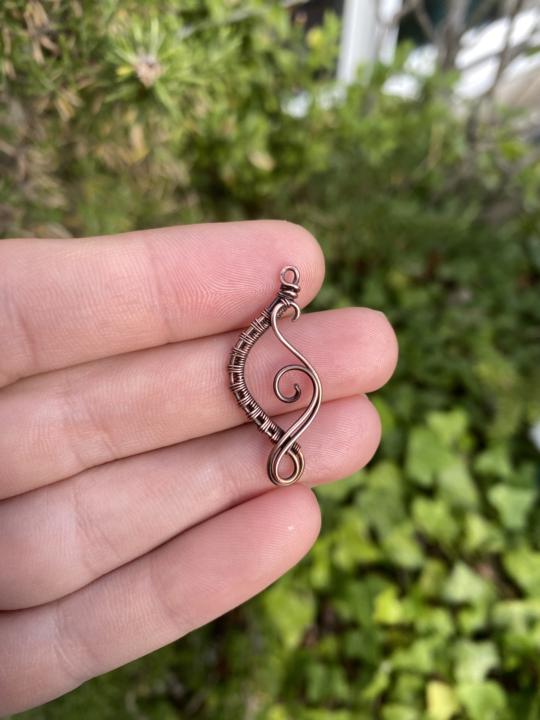
Next tutorial idea..
I really want to do some designs where you guys can practice weaving—what do you think of this earring design? Hopefully I can practice and get it filmed this week. I’ve been dealing with some intense anxiety over the past week as my body still adjusts to life postpartum and post-nursing—what a roller coaster it’s been 😅 but this community has helped a lot and seeing everyone interacting has made me so happy ☺️ thank you guys for being here! 💖

1 like • Jun 4
Absolutely love it 😀 😍
1 like • 28d
Awe I hope you feel better sending healing vibes your way, take your tome and take care of you!! I would certainly hope no one would have any issues with you worry about your rest and knowing you're be back on your feet soon!!! Take care darlin!
Mar 9 •
Welcome new members! 🥳
I’m so excited to see so many new faces on here! I’d love to know where you’re from! 🌎 Let me know in a comment below ☺️

2 likes • May 29
Virginia beach, Va
1 like • May 30
@Abbey Griffin thank you
May 26 •
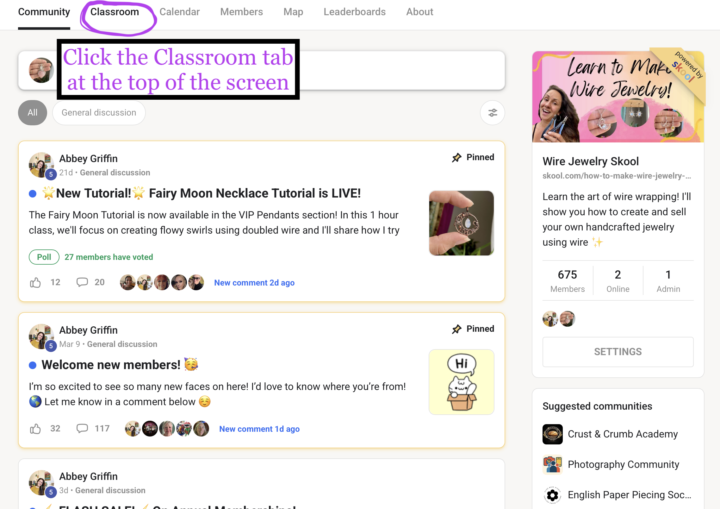
How to Access the Tutorials and Upgrade Your Membership Plan
I've been getting a few questions on how to access the locked tutorials so I made a quick screenshot guide and later this week I'll try and film a guided video tour. Here's a step by step guide: 1. Click the Classroom tab at the top of your screen 2. You will see the available Free courses and the Locked courses. The Tutorial Index will show you photos of what's inside the courses. (This may not be up to date with every single lesson but I try ☺️) 3. Click on a locked course and click Unlock to access the membership pricing page 4. You will see monthly prices and when you click "Join" you will see the corresponding Annual Prices. Monthly plans can be changed back to the Free plan at anytime by going to Settings 5. To manage your membership, go to Settings (this is available in the app by clicking the ... at the top righthand corner of your screen) As always, you can message me if you have any questions!
2 likes • May 29
Hi Ms Abbey ty for the invite and approval so excited to check out some wire wrapping videos!!! Your awesome
1-3 of 3
@april-johnston-7064
Hi I'm April from VA love creating art i make jewlery I paint, make crochet bags and baby clothes pretty much if it's at I'll try it out
Active 27d ago
Joined May 29, 2026