Activity
Mon
Wed
Fri
Sun
Sep
Oct
Nov
Dec
Jan
Feb
Mar
Apr
May
Jun
Jul
What is this?
Less
More
Owned by Anna
Where grandparents can learn simple ways to turn everyday moments into meaningful connections w/their grandkids whether they're nearby or miles away.
Memberships
Skooligans
578 members • Free
DG Community Builders
134 members • $97/m
the skool CLASSIFIEDS
2k members • Free
THE SKOOL HUB
5.5k members • Free
Leadership Skool
1.7k members • Free
The SKOOL Directory
890 members • Free
The Directory On Skool
968 members • Free
Skool Events Daily
426 members • Free
✨ Digital Boss Hub ✨
1k members • $3/month
4 contributions to Skool Extensions 🧩

🔥
Jun 20 •
💬 Why you should use the Extension Chat Panel ...
If you like videos like this, leave me a comment. Then I'll record more of it in the future 💪🏼


2 likes • Jun 21
I agree...I love these short videos. I haven't activated anything yet, cause I haven't had time to stop and go through to figure everything out. Short videos like this will make it easier for me to get started! Thank you.
1 like • Jun 21
@Kimberly Armatys thank you Kimberly, appreciate it 😊
🔥
Jun 20 •
Schedule Posts (VIP Feature 💎)
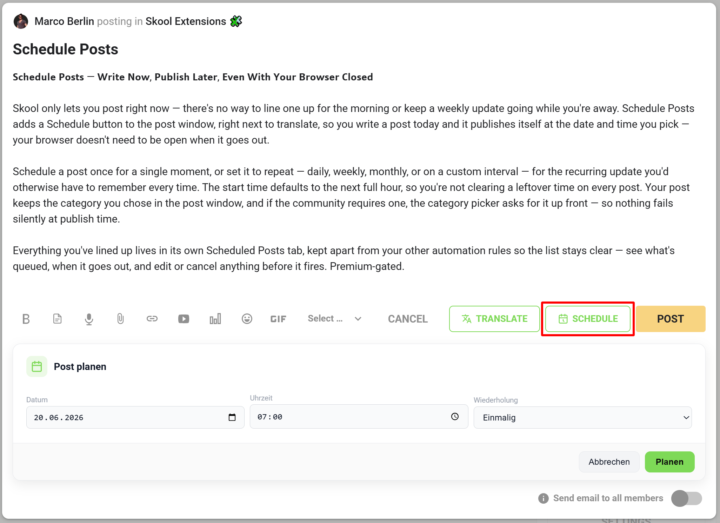
𝗦𝗰𝗵𝗲𝗱𝘂𝗹𝗲 𝗣𝗼𝘀𝘁𝘀 — 𝗪𝗿𝗶𝘁𝗲 𝗡𝗼𝘄, 𝗣𝘂𝗯𝗹𝗶𝘀𝗵 𝗟𝗮𝘁𝗲𝗿, 𝗘𝘃𝗲𝗻 𝗪𝗶𝘁𝗵 𝗬𝗼𝘂𝗿 𝗕𝗿𝗼𝘄𝘀𝗲𝗿 𝗖𝗹𝗼𝘀𝗲𝗱 Skool only lets you post right now — there's no way to line one up for the morning or keep a weekly update going while you're away. Schedule Posts adds a Schedule button to the post window, right next to translate, so you write a post today and it publishes itself at the date and time you pick — your browser doesn't need to be open when it goes out. Schedule a post once for a single moment, or set it to repeat — daily, weekly, monthly, or on a custom interval — for the recurring update you'd otherwise have to remember every time. The start time defaults to the next full hour, so you're not clearing a leftover time on every post. Your post keeps the category you chose in the post window, and if the community requires one, the category picker asks for it up front — so nothing fails silently at publish time. Everything you've lined up lives in its own Scheduled Posts tab, kept apart from your other automation rules so the list stays clear — see what's queued, when it goes out, and edit or cancel anything before it fires. --- 𝗣𝗼𝘀𝘁𝘀 𝗽𝗹𝗮𝗻𝗲𝗻 — 𝗝𝗲𝘁𝘇𝘁 𝘀𝗰𝗵𝗿𝗲𝗶𝗯𝗲𝗻, 𝘀𝗽𝗮̈𝘁𝗲𝗿 𝘃𝗲𝗿𝗼̈𝗳𝗳𝗲𝗻𝘁𝗹𝗶𝗰𝗵𝗲𝗻, 𝗮𝘂𝗰𝗵 𝗯𝗲𝗶 𝗴𝗲𝘀𝗰𝗵𝗹𝗼𝘀𝘀𝗲𝗻𝗲𝗺 𝗕𝗿𝗼𝘄𝘀𝗲𝗿 Skool lässt dich nur sofort posten — es gibt keine Möglichkeit, einen Beitrag für den Morgen vorzubereiten oder ein wöchentliches Update laufen zu lassen, während du weg bist. „Posts planen" fügt dem Postfenster einen Planen-Button hinzu, gleich neben „Übersetzen": Du schreibst einen Post heute, und er veröffentlicht sich von selbst zum Datum und zur Uhrzeit, die du wählst — dein Browser muss dafür nicht offen sein. Plane einen Post einmalig für einen einzelnen Zeitpunkt oder stell ihn auf wiederkehrend — täglich, wöchentlich, monatlich oder im eigenen Intervall — für das regelmäßige Update, an das du sonst jedes Mal denken müsstest. Die Startzeit steht standardmäßig auf der nächsten vollen Stunde, sodass du keine übrig gebliebene Uhrzeit bei jedem Post wegklicken musst. Dein Post behält die Kategorie, die du im Postfenster gewählt hast, und braucht die Community eine, fragt die Kategorie-Auswahl gleich danach — so scheitert nichts still beim Veröffentlichen.
4 likes • Jun 21
Love this...
🔥
May 17 •
Guided Tour
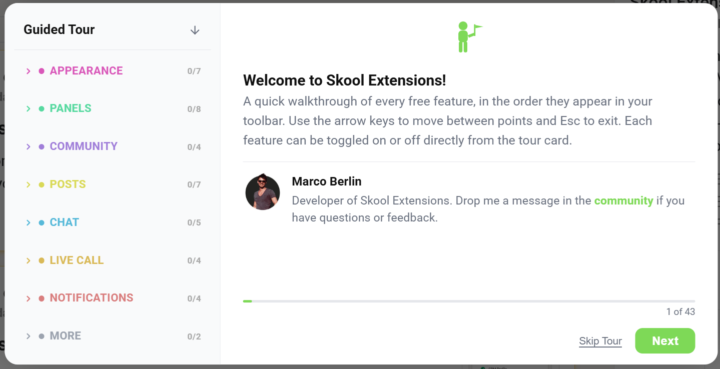
𝗚𝘂𝗶𝗱𝗲𝗱 𝗧𝗼𝘂𝗿 — 𝗔 𝗵𝗮𝗻𝗱𝘀-𝗼𝗻 𝘄𝗮𝗹𝗸𝘁𝗵𝗿𝗼𝘂𝗴𝗵 𝗼𝗳 𝗲𝘃𝗲𝗿𝘆 𝗘𝘅𝘁𝗲𝗻𝘀𝗶𝗼𝗻 𝗳𝗲𝗮𝘁𝘂𝗿𝗲, 𝘀𝗵𝗼𝘄𝗻 𝗹𝗶𝘃𝗲 𝗶𝗻𝘀𝗶𝗱𝗲 𝗦𝗸𝗼𝗼𝗹 The Skool Toolkit has grown to over sixty features. The settings panel lists them all, but a name and a one-line description don't really show you what a feature looks like. The Guided Tour walks you through the whole toolkit step by step, right inside your own Skool community, with each feature highlighted live on the page where it actually lives. There are two versions: a Free Tour covering everything in the free tier, and a separate Premium Tour for premium features. Both launch the same way — from the green "Start Tour" button in the welcome popup, the toolbar button, or the entry at the top of the settings panel. If you exit halfway, the next time you open the tour it offers to pick up right where you left off. What sets it apart from a static screenshot tutorial is that it never leaves Skool. When the next step is a Discovery feature, the tour navigates you to Discovery. When it's a setting that only makes sense in a live call, it routes you into a call. Each step paints a green frame around the actual element being explained and dims everything else with a soft spotlight, so your eye lands exactly where it should. You see the feature in its real context with your own data — not in a mock-up. The tour card sits at the bottom of the screen and stays out of your way. It has a short title, a few bullet points, an "Enable this feature" switch for features with an on/off setting, and back/next buttons. Toggle a feature inside the card and your choice sticks — switch off Custom Tooltips mid-tour and they stay off when the tour ends. For features that depend on a list (which communities get the translate button, which languages to skip), the same picker from the settings panel is built right into the card, so you can configure as you go. A small link icon in the top-right corner opens the feature's full announcement post in a new tab if you want the deep dive. Translation steps get a clever twist. Demoing automatic translation only works if the page is in a language you don't already speak — translating English into English shows nothing. So at the Discovery step, the tour filters Discovery by a language other than yours; at the about-page step, it routes you to a foreign-language community (German by default, Italian if you already speak German). The moment you land on the step, you actually see the toolkit translating real content into your language.
5 likes • May 17
Amazing! Definitely going to spend some time with this tour today. Agree with Kimberly - the ability to pick up where I left off is priceless. Thank you.
🔥
Mar 23 •
👑 Skool Extensions Premium - Skool Game Next Level 🚀
𝗘𝘃𝗲𝗿𝘆𝘁𝗵𝗶𝗻𝗴 𝗣𝗿𝗲𝗺𝗶𝘂𝗺 𝘂𝗻𝗹𝗼𝗰𝗸𝘀, 𝗶𝗻 𝗼𝗻𝗲 𝗹𝗶𝘀𝘁 — 𝘀𝘁𝗮𝗿𝘁 𝗮 𝗳𝗿𝗲𝗲 𝘁𝗿𝗶𝗮𝗹 𝘁𝗼 𝘁𝘂𝗿𝗻 𝗮𝗹𝗹 𝗼𝗳 𝗶𝘁 𝗼𝗻: ✓ Advanced Member List — filter, sort and message hundreds of members at once instead of one by one ✓ Sales Pipeline — track every lead through clear stages so none ever slips through the cracks ✓ CRM Profiles — notes, tags and the full history for each member in one place ✓ Automations — no-code workflows that handle repetitive tasks for you around the clock ✓ REST API — connect your own tools and scripts directly to your community data ✓ MCP Server — let AI assistants read and manage your community ✓ Calendar Helpers — create, sync and manage all your events without leaving Skool ✓ Admin Stats — track growth, engagement and retention in one clear dashboard ✓ Course Overview — a full overview of your courses, plus copy lessons between modules in seconds ✓ Course Checklists — guide members step by step through your courses ✓ Live Call Attendance — see exactly who attended each live call, tracked automatically ✓ Member Tagging — tag and categorize members to segment your community any way you like ✓ Video Download — download any video from posts and keep it saved on your device Upgrade to Premium --- 𝗔𝗹𝗹𝗲𝘀, 𝘄𝗮𝘀 𝗣𝗿𝗲𝗺𝗶𝘂𝗺 𝗳𝗿𝗲𝗶𝘀𝗰𝗵𝗮𝗹𝘁𝗲𝘁, 𝗶𝗻 𝗲𝗶𝗻𝗲𝗿 𝗟𝗶𝘀𝘁𝗲 — 𝘀𝘁𝗮𝗿𝘁𝗲 𝗲𝗶𝗻𝗲 𝗸𝗼𝘀𝘁𝗲𝗻𝗹𝗼𝘀𝗲 𝗧𝗿𝗶𝗮𝗹, 𝘂𝗺 𝗮𝗹𝗹𝗲𝘀 𝘇𝘂 𝗮𝗸𝘁𝗶𝘃𝗶𝗲𝗿𝗲𝗻: ✓ Erweiterte Mitgliederliste — filtere, sortiere und schreibe Hunderte Mitglieder auf einmal an, statt einzeln ✓ Sales Pipeline — verfolge jeden Lead durch klare Phasen, damit dir keiner durchrutscht ✓ CRM-Profile — Notizen, Tags und die komplette Historie jedes Mitglieds an einem Ort ✓ Automatisierungen — No-Code-Workflows, die wiederkehrende Aufgaben rund um die Uhr für dich erledigen ✓ REST API — verbinde deine eigenen Tools und Skripte direkt mit deinen Community-Daten ✓ MCP-Server — lass KI-Assistenten deine Community lesen und verwalten ✓ Kalender-Helfer — erstelle, synchronisiere und verwalte alle Events, ohne Skool zu verlassen
2 likes • Apr 1
This sounds so exciting!! and BRILLIANT 🤩
1-4 of 4

@anna-murrietta-7334
After 25+ yrs as a corp leader, I’m now designing my life of freedom & purpose. I’m happiest w/my family, travel & enjoying the simple joys in life.
Active 12m ago
Joined Mar 24, 2026
California
Powered by