Activity
Mon
Wed
Fri
Sun
Aug
Sep
Oct
Nov
Dec
Jan
Feb
Mar
Apr
May
Jun
Jul
What is this?
Less
More
Memberships
AI Automation Agency Hub
329.1k members • Free
Samin's Free AI Resource Hub
18.4k members • Free
ShoppableVideos.com (SV)
320 members • Free
AI SEO Mastery with Caleb Ulku
3.2k members • $27/month
DP
Digital Product Creators Club
767 members • Free
AI SEO Mastery Pro
581 members • $197/month
Grow My Business LIVE
308 members • $1,997/year
HYROS Ads Hall Of Justice
4.8k members • Free
Root Collective
3.6k members • Free
17 contributions to Digital Product Creators Club

19d •
✨ New: Rewrite any part of your book with a single instruction
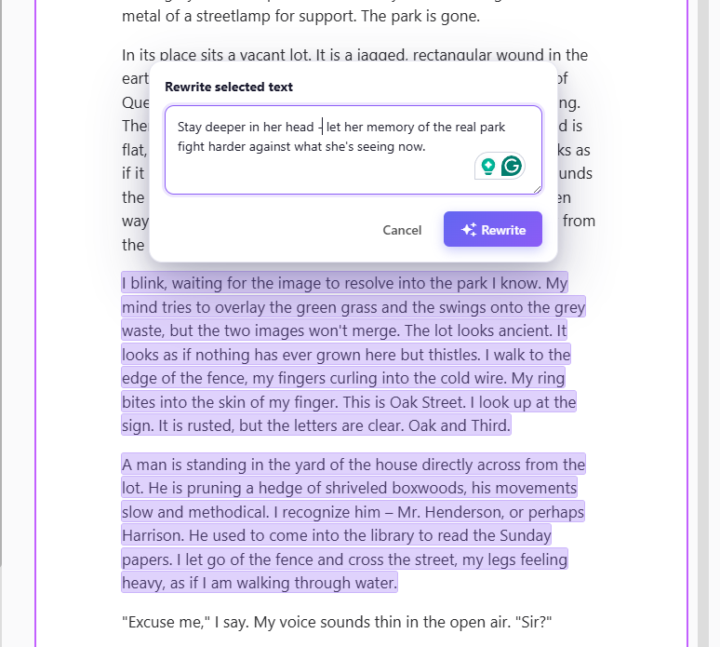
Hey everyone, I just shipped something I'm genuinely excited about, and I think it's going to change how you polish your books inside BookNova. Up until now, if you wanted to change a sentence or a scene, you either edited it by hand or regenerated the whole chapter. Today I'm giving you something far more surgical: you can now rewrite any specific piece of text just by selecting it and telling the AI what you want. Here's how it works: Highlight any sentence, line of dialogue, or paragraph in your chapter (just drag your mouse over it). A small Rewrite button pops up right above your selection. Click it, and a box slides open. The text you picked stays highlighted, so you always know exactly what's about to change. Type an instruction for how you want it rewritten — or leave it empty for a standard rewrite — and hit Rewrite. That's it. The AI rewrites only the part you selected, in your book's language, using the same model that wrote the chapter — so it blends right in with the prose around it. The real power is in the instruction box — this is where you direct the scene like a showrunner. A few examples of what you can actually type: "Give her dialogue a sharper, more sarcastic edge — she's hiding how scared she is." "Rewrite this fight so it's chaotic and close-quarters instead of clean and choreographed." "Add a beat of physical tension between them before he answers." "Make the villain's threat quieter and more menacing — no shouting." "Switch this from telling us he's grieving to showing it through small actions." "Slow this moment down and stretch the suspense right before the door opens." "Layer in sensory detail — what the tavern smells and sounds like." "Plant a subtle hint here that she's lying, without giving it away." "Deepen the POV so we're fully inside his head during the betrayal." You can get as specific as you like — name the character, the emotion, the stakes. The more precise your direction, the closer the result lands to the scene in your head.

1 like • 18d
Super useful feature. Thanks @Zigmars Berzins 🙏🏼
24d •
Should I ban em-dashes "—"?
A lot (like A LOT) of clients are complaining that they don't want to see these AI em-dashes. Should I ban them 👉 "—"? And just keep the occasional regular, small "-" ?
1 like • 24d
I wouldn’t ban it… people can edit or even put it in their prompts/instructions for AI to not use them… I have set up instructions for Claude to not use them when I am generating say google reviews replies on other platforms that use AI integration


3 likes • May 31
lol 😆 yeah absolutely 👍🏼
May 26 •
New on BookNova: Publishing Rights documents. ⚡️⚡️⚡️
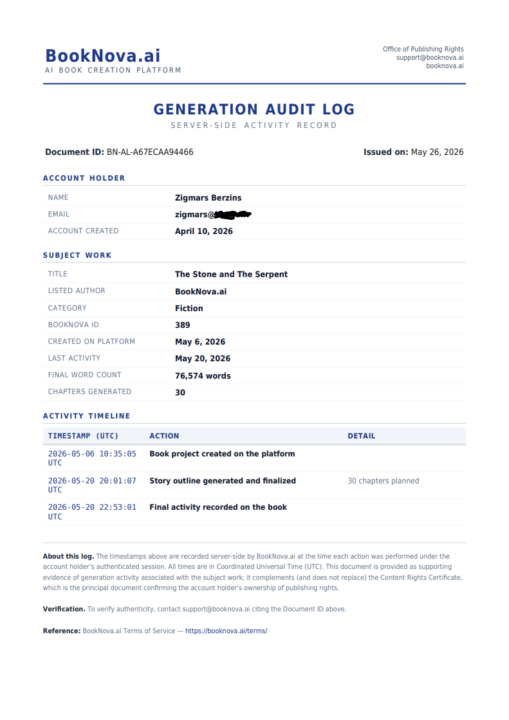
KDP is asking more and more AI-assisted authors to prove they own their work — and most have no idea what to send. We just fixed that. Inside your account, every book now has two official documents you can download instantly: → Content Rights Certificate — a signed statement confirming BookNova claims zero rights to your book. You own 100%. → Generation Audit Log — a server-timestamped record showing your book was created on your account, chapter by chapter. Exactly the kind of paperwork KDP, IngramSpark, and Apple Books ask for when they want proof. One click. Free for every user. Open the new "Publishing Rights" tab in your sidebar to grab yours.
2 likes • May 27
These are great features and tremendously helpful.
Apr 24 •
BookNova for Novels, TextBuilder Back to Its Roots...
I thought about it for a long time, ran extensive tests, surveys, and looked at the data on my end - and I realized that TextBuilder needs to go back to its roots, back to SEO, and also to my promised bonus PDF book writer. But the new fiction books - romance, drama - let those move over to the new project: BookNova. These are 100% different audiences. For romance writers, those SEO articles were simply confusing and felt very off, while the existing SEO clients don't like seeing some kind of romance and drama showing up in the project. :D On top of that, developing the projects themselves caused problems. Claude Code frequently mixed up sections, programmed everything incorrectly - AutoWriter, Non-Fiction books, Fiction books, and the old AutoPilot had already appeared - and it often made changes to files that ended up breaking other sections as well. That's why I decided to clean up the code and optimize everything for AI programming, so I can develop the projects even faster. That's why I decided to separate this fiction book writing from TextBuilder, so it can live its own life going forward - in a completely different world, with a completely different audience and website. Because both of these audiences (SEO and romance book writers) are 100% different. To avoid chaos in the data and databases - I created a brand new database, and that's why this project has started a completely new life."
0 likes • Apr 24
I’m OK either way
1-10 of 17

Active 4h ago
Joined Mar 1, 2026
ENTP
San Diego, CA