Activity
Mon
Wed
Fri
Sun
Sep
Oct
Nov
Dec
Jan
Feb
Mar
Apr
May
Jun
Jul
Aug
What is this?
Less
More
Owned by Andrew
Go from Resolve beginner to confident editor with a clear roadmap. Create better videos and build skills you can get paid for. 💰
Build, price, and launch your $5K+/m video editing offer in 6 weeks, with direct coaching to help you find and convert consistent clients.
DaVinci Resolve for Beginners!
25.5k members • Free
Earn With Content
2.3k members • Free
AI Video Bootcamp
26.7k members • $9/month
The $100k YouTuber (Free)
1.5k members • Free
Mid-Life Creator Community
28 members • Free
The Edit Room
4 members • Free
The YouTube Blueprint
2.6k members • Free
Free Skool Course
71.3k members • $1
Old Me Living
303 members • $5/month
9 contributions to Creator Boost Tribe

Apr 20 •
Quick question for educational creators building a business on YouTube
I’ve been spending a lot of time lately helping creators close the gap between the level of value in their content and how their videos actually come across on screen (lighting, framing, audio, editing, and overall polish). That’s also what most of my YouTube content is focused on right now. I’m trying to understand how real this problem is for people. If you’re posting consistently and trying to build authority: Do you ever feel like your videos look lower quality than others in your niche, even when your ideas are just as strong? I’ve been considering going deeper on solving this, but I don’t want to assume it’s something people actually care about enough to fix. Curious where you’re at:
Poll
2 members have voted
0 likes • Apr 23
@Jason Beals Right now it's something I'm launching which will be a cohort where I help a small group of people do this. https://andrewgfarmer.kit.com/videomakerschool
0 likes • Apr 23
@Jason Beals It will not be free. I haven't advertised the founding price yet, so I can't give you the exact cost. It will obviously start at a highly discounted rate as this will be the founding cohort.
Nov '25 •
A Fresh Take on “Authenticity” Every New YouTuber Needs to Hear
I came across a short 3-minute video from someone in my Creator Lab community that really challenged how I think about authenticity on YouTube. The creator, Yury, argues that being authentic doesn’t mean avoiding imitation. From day one, we learn by copying, so instead of fearing it, study the best creators, borrow what works, and shape it into your own authentic style. It’s a simple but powerful reminder that improving your skills is part of being authentic. If you’re building your channel and trying to “find your voice,” this is absolutely worth three minutes of your time. → https://youtu.be/LCNoN2l8On4?si=wk7Uvo7bpVay9tAk What’s one skill or habit you’ve borrowed from another creator that actually helped you sound more like yourself?
2 likes • Nov '25
I'm trying to borrow the skill of making videos I want to see, or would've wanted to see, from MKBHD. He always says that's what got him started making videos.
0 likes • Nov '25
@Jeffery Schwartz for what exactly?
Nov '25 •
A little editing trick that’s been saving me hours lately
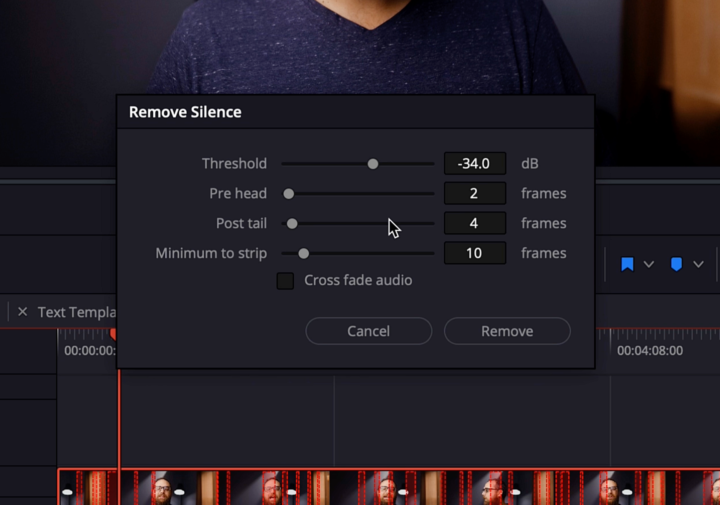
I’ve been editing a lot of videos lately and realized how much time I used to waste manually cutting out silences. If you’re using DaVinci Resolve, there’s a tool called Ripple Delete Silence (it’s even in the free version). You just select your clip, go up to “Clip” → “Audio Operations” → “Ripple Delete Silence,” and it automatically finds and removes every pause in your A-roll. I dropped a screenshot below showing the default settings I use, nothing fancy, just what’s worked best for me after a bunch of trial and error. It’s wild how much smoother your pacing feels afterward, and it instantly cuts a ton of dead air without over-editing. If you use another editor, it’s worth checking if there’s something similar. It’s one of those little features that makes a big difference. I shared a few AI tools in Resolve in a recent video, but this one might be the single biggest time-saver I’ve found so far. Just wanted to pass it along in case it helps someone else speed things up.
1 like • Nov '25
@Maria Anokhina awesome!
1 like • Nov '25
@Nurul Chowdhury yeah features like this save some much time.

🍀
Oct '25 •
Want to Collab?
If you are open to doing a collaboration with someone in this community, drop your niche below as a signal that you are open to it! Let's help each other go further faster. (Thanks Ajayy for the idea!) *Not a place to sell your services*

10 likes • Oct '25
That's a cool idea! I have two channels. One is on how to make better videos. The second one is on how to use clarity to create videos that grow their brand and business.
0 likes • Nov '25
@Florence Donald https://youtube.com/@andrewgfarmer https://youtube.com/@growwithandrew

Jul '25 •
Enjoying videos from group members
I’m so glad I joined this group. I’ve been going around checking YouTube channels of members and I’m enjoying it so much. I have to say, I’m loving the content from @Mike Bayer . You share very solid wise advice. I love your perspective! Very inspiring. 😊❤️ I’d love to see more channels but not everyone has a link in their profile. Share your channel in the comments 👇🏽 and a little bit about what it’s about so that we all can see. 😊
0 likes • Jul '25
@Mona Weathers I've never used Filmora, but those settings look pretty common. Scale will change the size of whatever you have selected. For instance, if you want to zoom into your video clip, you can change the scale to a value higher than 100%. The Position will change the clip's position on the screen. Rotate will rotate the clip, and so on. If you click the diamond shapes to the right of these settings, it will most likely create a key frame at that exact time in the clip. Then, if you move to another part of the clip and change those values, it will make another keyframe. Which will mean that the clip will move from the first settings to the second. Then, finally, the Path Curve will probably adjust the timing of those keyframe animations to be smoother. Again, I've never used Filmora, but I think those settings are fairly universal.
1 like • Jul '25
@Mona Weathers Those are good suggestions, thanks!
1-9 of 9

@andrewgfarmer
YouTube editor. Founder of Resolve School and Productized Editor. Follower of Jesus, husband, dad of 5, F1 fan.
Active 5h ago
Joined Sep 5, 2025
Powered by