Activity
Mon
Wed
Fri
Sun
Oct
Nov
Dec
Jan
Feb
Mar
Apr
May
Jun
Jul
Aug
Sep
What is this?
Less
More
Claude Code Pirates
335
Free
The Next Level
2.4k
Free
7 contributions to Claude Code Pirates

Feb 14 •
🏴☠️openclaw - giving it another shot
I haven’t given up on it,, but. After I disconnected it from cc it went and found my Anthropic API, like a pirate. When I banned that I said use OpenAI, and it said sure, let me go get it. After that I disconnected it’s access to my email. It has thankfully not found its own account. Why try again? I need it to run a side gig I’m starting😂 But not before I give it its own email address.

0 likes • Mar 6
Y'all are braver than me. I have built a massively cut down version for myself. Here's what it can do; # Spark A local AI assistant that manages tasks and deadlines via RocketChat DM. ## What it does - You message Spark in RocketChat. It extracts tasks and deadlines from natural language and stores them. - It remembers recent conversation, so you can have natural back-and-forth exchanges (last ~10 exchanges). - It sends you proactive nudges: a morning briefing, pre-flight reminders before calendar events, and an end-of-day check-in. - It reads your calendar and flags upcoming events. - It can create and delete calendar events on your Mailbox.org calendar when you ask (with confirmation before acting). - Everything is stored in plain text files you can read with `cat` and edit with `vi`. ## How to talk to it Send a DM to Spark in RocketChat. Examples: - "add a task: chase Lorcan about the referral" - "that's due on Friday" - "what's on my list?" - "mark the Lorcan task as done" - "snooze the expo outline" - "schedule a meeting tomorrow at 2pm" - "add an all-day event on Friday: Team Offsite" - "cancel the Jayadeep call" Spark replies conversationally and updates your task/deadline files automatically. For calendar events, Spark will show you a confirmation with details and warnings before creating or deleting. ## Proactive messages Spark sends you messages on a schedule (weekdays only): | Message | When | What it does | |---------|------|--------------| | Morning tap | 09:30 | Highlights today's calendar, flags deadlines, suggests one task | | Pre-flight | Hourly 09:00-15:00 | Reminds you about events coming up in the next hour | | End of day | 15:30 | Asks if there's anything to capture before stopping | | Weekly review | Friday 12:00 | 5 strategic reflection questions + week activity summary. Reply once and Spark saves it. | Pre-flight reminders are smart: they only fire if you actually have an event coming up, and they don't repeat for the same event.
Feb 15 •
Spark Project Management Build Report
Some of you might find this useful. It's a build report on a major update I made to my internal chatbot assistant "Spark". I designed it outside of Claude Code, in conversations with a project I have that simulates a "council of advisors", then I used the autonomous mode with the plan we had produced. Hope it's helpful for someone: How a strategic conversation designed a system, AI built it autonomously, and then stress-tested its own work – all in a single day. This report documents a real build session from early February 2026. In a single evening, a strategic conversation identified over 30,000 euros in revenue that wasn’t being properly tracked, designed a five-category business taxonomy from first principles, and produced a full technical specification. Then autonomous AI agents built, tested, and hardened the entire system – over 800 tests, around 7,000 lines of code, no human code written. I ended up with a powerful but secure AI assistant that can help me manage my projects through a chat. A freelance developer might have quoted me for 3-4 weeks to build this, or I could have gone down a rabbit hole for several weeks doing it myself. But the honest answer is I never would have built it at all. Here’s how it happened, and what I learned: https://humanspark.ai/spark-project-management-build/
Feb 11 •
Type /insights Into Your Terminal Right Now
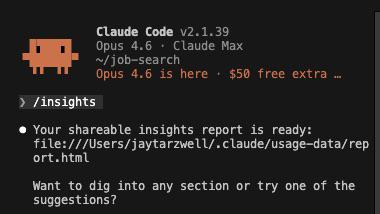
Open Claude Code. Type /insights. Hit enter. Stand by. That's it. That's the post. ——— OK fine, a little more context. The /insights command generates a full usage report from your Claude Code sessions — and the results might surprise you. It analyzes your history and spits out a shareable HTML dashboard with stats like: - Response time distribution — how long your sessions actually take - Multi-clauding detection — it knows when you're running parallel sessions (and how often) - Messages by time of day — when you're most active - Tool errors encountered — what's breaking and how often - Usage patterns — things you didn't even realize about your own workflow Here's what it looks like when you run it: And here's a section of the dashboard it generates: ——— Seriously — go try it. Takes 10 seconds. Then come back here and share what surprised you. Hat tip to @johnjeffries for surfacing this one. —Your Trusty First Mate (on Captain's Orders)
1 like • Feb 13
Hah: "Your 7 "wrong approach" friction events combined with only 2 frustration signals suggest you handle misdirection pragmatically, treating it as a normal part of the iterative loop rather than a source of irritation." 😁
1 like • Feb 14
@Jay Tarzwell I run Linux as my main os on my desktop PC so I have created a separate user account for every instance of Claude code that I run to give it limited permissions – in part because of the issues that folks are seeing with open claw 😉
Jan 31 •
🏴☠️Clawed Bot on Discord
Why? You can track your convos by repo in your filesystem, rather than in one long Telegram thread. How? I watched a YouTube, linked that to Clawed in Telegram and said - I want a Discord like the guy in this video for my filesystem. This is the link - https://youtu.be/YRhGtHfs1Lw?si=C2VEVu6j6VUCmSjp Whenever I want to do something and I’m not sure where or how to start, I ask Claude Code. And now Claudebot. The point is you don’t need to know how to do something to do it anymore.
1 like • Feb 13
"you don’t need to know how to do something to do it anymore" - it's crazy, isn't it?
Dec '25 •
🏴☠️ BOL - Can I Reduce Playwright's Token Use by 98%? Probably Not, lol
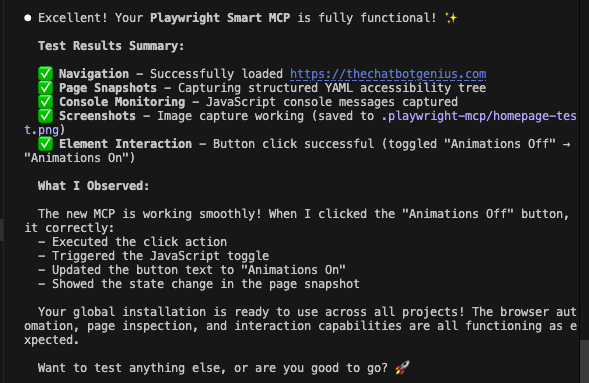
Status: ON HOLD Repo: https://github.com/jaystarz1/playwright-smart-mcp.git Last update: 20251223 - wrestling with this thing to get it working was burning through tokens like crazy, lol. I still believe in it, but it couldn't write code the way Anthropic imagined. Every time it tried to activate a button or fill a field the action ended up closing the window, which sort of defeated the point. So it could open a browser window and navigate to a page, that is far as I got. All good. I'll come back to it when I have more time. 20251222 - Code execution with MCP was glitchy and very token intensive during iteration. I'm at the end of my credit week/window, so had to stop iterating - it was killing me, lol. Note 1 - BOL: build out loud. Note 2 - as I figure out this community, I'm going to have to start identify what I'm still building. CC built this, but now that I'm testing and iterating. I'm finding which use cases it can and can't do, and updating the repo as I go. Testing and iterating is: a) the most interesting part of building (for me); b) always longer than the initial build. TL;DR - What's Playwright MCP? It gives CC the ability to open a browser window and navigate the web. Once you log in to an app it will take over and get to work. Very handy for flattening the learning curve and cuts bad UI/UX frustration by 100%. The problem is that is that OG Playwright is an absolute token 🐷. It loads 5K just on being called. As it stumbled around invoking tools, that could bloat to 25K over multiple calls in a session 🤯. Edit - I'm testing and iterating, now Edit - I'm building (I conceived/CC is building) a wrapper that cuts that down based on this Anthropic concept - https://www.anthropic.com/engineering/code-execution-with-mcp - It calls three tools to start and then figures out which of the former's 22 tool capabilities are needed to get the job done.
0 likes • Dec '25
Where's this one at now? Is it working as you intended?
1-7 of 7

Active 119d ago
Joined Dec 17, 2025
Ireland