Activity
Mon
Wed
Fri
Sun
Aug
Sep
Oct
Nov
Dec
Jan
Feb
Mar
Apr
May
Jun
Jul
What is this?
Less
More
Memberships
AI Automation Made Easy
19.3k members • Free
AI Workshop Lite
37.6k members • Free
NextGen AI
46k members • Free
Open Source Voice AI Community
953 members • Free
Hackathon
2.7k members • Free
AndyNoCode
35k members • Free
AI Asnat Academy™
1.8k members • $7/month
The RoboNuggets Network (free)
57.5k members • Free
Flow State
1.4k members • Free
110 contributions to AI Automation Agency Hub

3d •
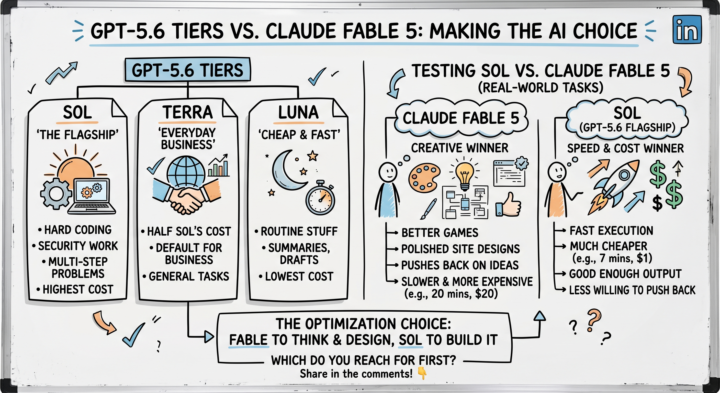
GPT-5.6's tiers — Sol, Terra, Luna
OpenAI renamed GPT-5.6's tiers — Sol, Terra, Luna and this time the names actually tell you something instead of making you decode a version number ⬩➤Sol — the flagship, priced accordingly. Hard coding, security work, multi-step problems. ⬩➤Terra — the everyday one. Roughly half Sol's cost, fine default for most business stuff. ⬩➤Luna — cheap and fast. Summaries, drafts, the routine stuff nobody wants to pay flagship prices for. It's similar to Claude's Opus, Sonnet and Haiku The interesting bit is a comparison someone ran: a full day testing Sol against Claude Fable 5 on actual tasks games, websites, coding, brainstorming not benchmark screenshots Fable came out ahead creatively Better games, better site designs, more polish, more willingness to push back on a bad idea instead of just executing it Sol came out ahead on speed and cost, no contest One project: Sol did it in 7 minutes for about a dollar Fable took 20 minutes and almost $20 for a comparable result Which one's better probably isn't the right question It's what you're optimizing for that day Fable if you want the strongest output and don't mind paying for it, Sol if "good enough, fast and cheap" actually is good enough Feels like the obvious move is using both: Fable to think it through, Sol to actually build it
3d •
Which one do you use the most?
Quick question for the builders here Claude Cowork or Claude Code, which one actually lives in your daily workflow If it is Claude Code, I want to know how you run it too CLI, VS Code extension, or the desktop app I use Claude Code the most, mostly through CLI VS Code extension comes in when I need to see the file changes visually instead of scrolling through terminal output Curious if others are doing the same or if I am missing a better setup Drop your combo below. Genuinely trying to compare notes here
3
0

5d •
Second brain of your Claude code projects
Your project grew big Now every small change means Claude Code re reads half your codebase just to remember what it already knew yesterday It is like hiring a smart assistant who forgets your entire company structure every single morning. You explain the org chart again. You explain who reports to who again. By the time they start actual work, half the day is gone That re reading is not free It is tokens and time, burned before Claude even touches your actual request The fix that is going viral right now is called Second Brain Instead of Claude re reading files every session, you build a graph of your project once Claude reads that graph instead of the raw codebase No more rediscovering the same structure again and again It shines on large, complex projects People are seeing 35 to 40 percent improvement in speed and token cost It is an open source solution, sitting at 79.7k stars on GitHub already Click here -> second brain If your project has outgrown "just read the files," this is worth 10 minutes to set up Anyone here already running a second brain setup with Claude Code? Curious what changed for you

7d •
Keep track of your Claude Ai usage
Checking Claude usage limits used to eat more of my attention than the actual work I Open Settings then scroll to usage and then close it, forget open it again 10 minutes later Small habit. Bigger distraction than I realized I found a Chrome extension that fixes exactly this It is open source. Full install steps are right there on the GitHub repo It sits inside the Claude ai chat window itself Session limit and weekly limit, both visible while you are mid conversation No extra tab. No extra click Small tool. Saved me more focus than I expected this week If you use Claude daily, this is worth 2 minutes to set up Checkout -> Claude Usage Tracker
3
0

Jun 10 •
I'M ALL IN!
I'm an aspiring AI automation enthusiast from Philippines currently learning how to use AI tools and workflow automation to improve productivity and solve everyday problems. I'm eager to develop practical skills and gain hands-on experience in this field.
0 likes • Jun 10
@Cristopher Quintana Hi, welcome to this wonderful AI community. So, what's the first problem you will solve with AI that you face everyday
1-10 of 110

@aditya-chauhan-5321
I Built Custom Solutions Using AI That Makes Your Life Easier
Active 17h ago
Joined May 26, 2025
INDIA
Powered by