Activity
Mon
Wed
Fri
Sun
Aug
Sep
Oct
Nov
Dec
Jan
Feb
Mar
Apr
May
Jun
What is this?
Less
More
Memberships
AI Automations For Business
2.8k members • Free
GannChart Pro
185 members • Free
AI Automation Society
418.3k members • Free
AI Automation Agency Hub
327.8k members • Free
AI Automation Agency Owners
3.4k members • Free
Brendan's AI Community
25.9k members • Free
MoneyLab 1% Club
21.2k members • Free
AI Freedom Agency
10.8k members • $26/month
GannChart Academy
594 members • Free
9 contributions to AI Automation Society

7h •
Just shipped my first production automation — CRM Sync with deduplication & error handling. Feedback welcome.
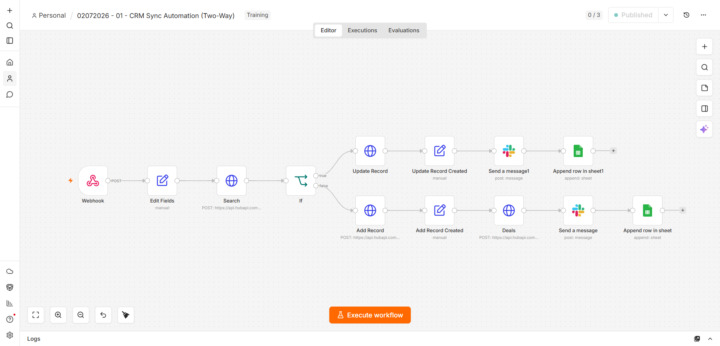
Hey everyone 👋 First real post here. I've been learning from a lot of you silently, and I just finished my first production-grade automation. Wanted to share the build and get your feedback. The Problem Small businesses capture leads via forms, then **manually copy the data into their CRM**. This means wasted hours, duplicate contacts, and a CRM nobody trusts. What I Built An n8n workflow that: 1. Receives form submissions via webhook 2. Normalizes the data 3. Searches CRM for existing contact by email 4. Updates if exists / Creates if not (deduplication) 5. Creates a deal associated with the contact 6. Sends a Slack notification to the sales team 7. Logs everything in a Google Sheet (audit trail) 8. Error Trigger → Slack alert + fallback sheet if anything fails The Workflow [Webhook: POST /crm-sync] ↓ [Set: Normalize fields] ↓ [HTTP Request: GET /contacts/search by email] ↓ [IF: contact exists?] ├── YES → [HTTP Request: PATCH /contacts/{id}] └── NO → [HTTP Request: POST /contacts] ↓ [HTTP Request: POST /deals] ↓ [Slack: Notify sales team] ↓ [Google Sheets: Append audit log] [Error Trigger] → [Slack: Alert] → [Google Sheets: Fallback save] Tech Stack - n8n (self-hosted on Railway) - Tally.so (form) - HubSpot CRM (REST API v3) - Slack (incoming webhook) - Google Sheets (audit log + fallback) What I Learned 1. API docs are everything — reading HubSpot's docs took longer than building the workflow. 2. Error handling is not optional — broke the API key on purpose to test. Silent failures are unacceptable for a paying client. 3. Test with bad data — missing fields, duplicates, special characters. Each edge case found a bug. 4. Audit logs build trust — the Google Sheet isn't just for debugging. It's what makes the client feel in control. What's Next - Two-way sync (CRM → Google Sheets back) - AI lead scoring (form data → OpenAI → route by score) - WhatsApp Business API notifications If you made it this far, thanks for reading. Any feedback, criticism, or "you should've done X instead" is welcome — that's how I'll get better. 🙏
0 likes • 1h
@Matei Campean thank you

Apr 14 •
Advise please from those who have "done this before"
Im struggling to decide what to follow/offer, so many options. If you can relate, can you help me, but letting me know the following: 1. What is the easiest and best Ai automation you've sold or are selling? 2. How much for (upfront and monthly)? 3. Did you SELL first, build after? or build first then sell? Thanks in advance!
1 like • Apr 14
interested

Apr 14 •
Day 1 challenge done
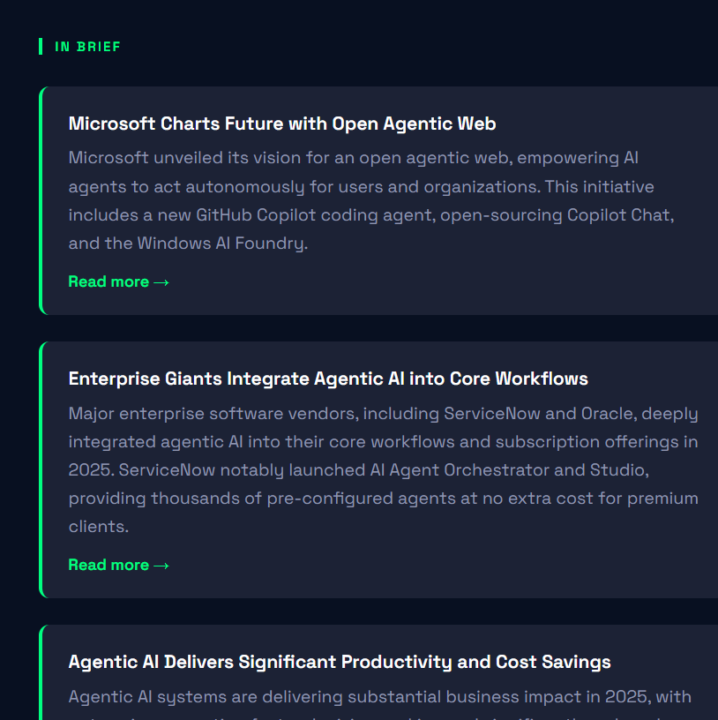
I built my first automated newsletter from scratch and honestly didn't expect it to actually work 😅 The moment it sent itself with real AI-curated content was kind of mind-blowing. No manual copy-paste, no formatting — just boom, done. If I had to change one thing: the design still looks a bit basic, I'd make it prettier on the next round.
1 like • Apr 14
Perfect

Apr 14 •
[fixed] How to enable Claude Voice in VS Code?
I was setting up Claude in Visual Studio as part of the 7-day challenge. I noticed that all the prompts were being read aloud instead of typed, but I didn't know how to use the voice, so... here's the solution: 1. Make sure you're using VS Code as an administrator. 2. Add the "Claude Voice" extension (it's the most popular one right now). 3. You might need to install other things, which is why you need administrator privileges. 4. Restart VS Code. 5. You'll see an icon in the bottom right corner (see image). 6. Ready to talk! (It's not complicated at all, but I tried it several times and realized I needed to use VS as an administrator.) It wasn't obvious until it was.
![[fixed] How to enable Claude Voice in VS Code?](https://assets.skool.com/f/b51c57150c70495899bf4bc8aaee8166/94d79d3407384c508d2f849b5fe537cfb6fdb968d0a041ea850ad7bdfdb18b20-md.png)
0 likes • Apr 14
[attachment]

💎
⭐
Apr 14 •
🚀New Video: Claude Code Just Dropped Routines. It's So Good.
Claude Code just launched routines, which let you run prompts on a schedule from Anthropic's cloud without keeping your laptop open. In this video I walk through exactly how to set them up, the gotchas I ran into migrating my automations, and how to configure your API keys, cloud environments, and permissions so everything actually works on the first try.
12 likes • Apr 14
Perfect
1-9 of 9

Online now
Joined Sep 8, 2025
Powered by