Activity
Mon
Wed
Fri
Sun
Jun
Jul
Aug
Sep
Oct
Nov
Dec
Jan
Feb
Mar
Apr
What is this?
Less
More
Memberships
Clief Notes
26k members • Free
AI Titans
416 members • Free
150 contributions to Clief Notes

Mar 14 •
Discord Group!
Hello Everyone, My name is Aaron, I am just a guy who is trying to learn more about technology as a whole and for now AI as my particular preference. I have been building PCs for 25 plus years, I have no formal education in technology per say, all just pure passion and love for the game. I have done networking infrastructure for million dollar homes, I have built PCs for friends and family as well as for work, I worked for Apple for almost 5 yrs. I honestly just wanted to learn how to do all this because I love learning and dont want to rely on anyone to do it for me. I have 4 kids, 24yr son and 18, 15, 7 yr old Daughters. I have been married for 18 years to my best friend and couldnt be more happier. I live in Hawaii but I work the NY Open exchange hours. So I am currently up at 2am every day till about 7pm. Last but not least I served in the Marine Corps for 8 years from 2003-2011 in a Infantry Battalion. So now you know a little bit about me. Oh, I also run a few youtube channels and I help run a few streams as well. So I am sure some of you have seen me talk in many discussions here started, only because I am just so happy to learn and gain knowledge from all you wonderful individuals. Yes I know I respond a lot but I am genuinely curious about many things related to this groups discussions on AI. Beyond that I am here to give you some good news. I had a great call with @Jake Van Clief today for about 30 mins, he is a just as caring as he is here in chat as he is on the phone. We talked many things, as some of you know we both are Marines and that of course is our bond! He has so many cool things coming for all of you, I cant even begin to tell you how excited I am for all of you here. You will learn so much here and its going to be an amazing ride. He believes so much in bringing value to this group not just in words but by showing you how to do things that I think are being gate kept but people in this AI world. Moving forward we will have a Discord group for our premium and VIP members to be able to directly communicate with each other via voice calls and share their ideas. This will also be a place where those members can share their workflows and possibly get an evaluation from Jake or one of the other team members who has experience in that field. Jake will specifically do 2 a month he said, how awesome is that!?
0 likes • 1h
@Jason Singh depending on your subscription you should have access to the vault or the drawing room and they have the links to discord
0 likes • 1h
@Jason Singh logout and log back in. It shows you as premium

🚀
⭐
7h •
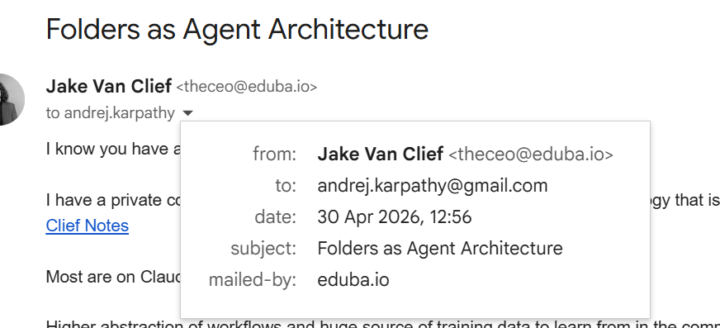
Trying to get Andrej Karpathy to come talk to us.
If any of you have his twitter/linked in, totally comment and tell him to respond to my email. Want him to come chat with all of us and I think he would be happy to just need him to get eyes on, as someone who gets thousands of emails a day I would not be surprised if he never sees it even if it is valuable.
4 likes • 7h
Woah!!!!

2d •
Small Win
Hey Everyone, Just wanted to share a small win for me today. I managed to secure my first sit down with a possible client today. I got talking to our contract manager at work today just general chit chat talking about his role and what it entailed. We got onto how late he has to work and how it was hard on the family so so forth. I said to him what if i could give you that time back through implementing software that did a lot of the heavy lifting when it comes to office admin. he laughed and asked how was that I explained lv learned how to use AI to build systems we went back and forth a bit about AI talking about where it might lead and such and I'm not going to lie basically regurgitated Jakes classes stating things like how its now to have a hand carved rifle will set you back a small fortune but way back when you would of been looked down on, I spoke about the part about human desire and how that will always be there. He was completely taken back to him I was now not just a vet and a carpenter I was the future and Iv been asked to come to the office tomorrow to sit down and talk. I know its only a sit down and nothing confirmed but when i first approached them i was basically laughed out the office and given work via what's app but that small amount of knowledge might be the reason my life changes for the better. So thank you @Jake Van Clief .for giving this course away and helping complete beginners like me a fighter chance of a better future.
0 likes • 2d
YES THIS IS WHAT I AM TALKING ABOUT!! LETS GO!! Congratulations on all your hard work and your achievement!!
🚀
⭐
2d •
📚 Big drop this week — both Tea sessions are out
The full hour-long session of afternoon tea is live on my YouTube. Anyone can watch it. Premium documents and prompts from session: Session 2 - 4/25/26 - The Vault · Clief Notes VIP session recording and documents are here: Session 4 - 4/25/2026 - The Drawing Room (VIP) · Clief Notes Two sessions this week and the artifact packages just landed for paid members. Here's what got covered so the whole community can see what's in each one. 🎩 VIP Session 4 — Replacement, Governance, and the Emerge Methodology 📦 @Marcin Hakemer-Fernandez asked if his language-learning app gets cloned in two months. We pulled in the Liquid Paper story (kitchen blender, sold to Gillette for $47.5M) and landed on the real question: are you building an AI company, or a company that uses AI? Different game, different moat. ⚖️ @Tiffany Coyle flagged a real consent gap on how AI platforms handle reporting. We walked through three actual 2026 cases: Italy fined OpenAI €15M, the EU Parliament banned Claude and Copilot internally, Microsoft confirmed a Copilot bug that exposed confidential email summaries for six weeks. Then the open-source escape hatch (Ollama, AnythingLLM, Open WebUI, Jan, OpenLLM, Spellbook ZDR) for anyone who needs privacy across every market. 👤Austin asked whether to build his name at his company or build his own. Answer: both. They're concentric circles. We worked through the Second-Order Problems Framework live — the move that lands authority faster than any pitch. 🌐 Plus the Emerge Conference build I covered for Matt (he was sick). 300+ branded websites in two days, 7M tokens burned, hosted free on GitHub Pages. Full methodology in the artifact package. 🔒 VIP members — the full Decision Map deck plus five companion MDs (Replacement and Framing Thesis, AI Governance Field Guide, Personal Brand and Second-Order Problems, Emerge Methodology, Term Sheet) are in the Drawing Room now. Recording's in there too.
5 likes • 2d
Exiting Times!!! Lets go!!!!! @Jake Van Clief j
🚀
⭐
2d •
Each dot is 3.2 million people.
📊 You've probably seen this chart floating around LinkedIn and Twitter Each dot is 3.2 million people. ⬜ Grey is the 84% of humans who have never used AI 🟩 Green is the 16% who have used a free chatbot 🟨 Yellow is the 0.3% who pay for one 🟥 Red is the tiny sliver who use AI coding tools Most of the people sharing it have not actually said what it means. So here it is. 🔁 We live inside an algorithm. Mine shows me AI all day. Yours probably does too. Every reel, every post, every podcast clip, every ad. The feed makes it feel like the whole world has moved on without you and you are sprinting to keep up. Inside Clief Notes that feeling gets louder. You log in and see people building agents, shipping side projects, automating their inbox, talking about Claude Code and MCP servers like it is normal. In this room, it is. Step outside and almost nobody is doing any of it. 6.8 billion people have never opened a chatbot. Plenty of the ones who did opened it once, asked it something dumb, got a dumb answer, and decided the whole thing sucked. They are not coming back this year. Maybe not next year either. 🪖 When I was in the Marine Corps I never felt like I was doing anything special. I was surrounded by other Marines. Everyone around me could do what I could do. The standard was the standard. It was not until I left and stood next to people who had never served that I understood. The thing I thought was ordinary was rare. I just could not see it because I was inside it. That is what is happening to you in here. If you feel behind in this community, that is the right feeling to have. It means you are standing next to the people pushing the edge. Step outside this room and the thing you are calling behind is so far ahead of where most of the world is sitting that they cannot see you from where they are. And do not forget. The thing you built last week, the workflow you set up this morning, the conversation you just had with Claude. A version of you from two years ago would have paid good money to do any of it.

2 likes • 2d
@Jake Van Clief I keep saying this is the beginning of the “AOL era” of AI. Thanks for confirming!
1-10 of 150
@aaron-quiroz-8812
Marine, married 18 yrs, 4 kids. Just want to help others
Online now
Joined Apr 11, 2026
Powered by