Activity
Mon
Wed
Fri
Sun
Jun
Jul
Aug
Sep
Oct
Nov
Dec
Jan
Feb
Mar
Apr
May
What is this?
Less
More
Owned by Aaron
Mentorship community for business analysts to grow their skills in Excel, SQL, & Automation.
Memberships
Mobility & Injury Prevention
209.1k members • Free
Skoolers
188.9k members • Free
Python Developers
1.2k members • Free
Synthesizer: Free Skool Growth
42k members • Free
47 contributions to Excel Analytica

Jan 1 •
Hello
My name is Okuboere, I’m happy to join this community and currently a beginner in learning Excel

0 likes • Jan 10
Welcome @Okuboere Ebiasuode I'm glad you're here. If you're just starting out, I recommend the Excel Fundamentals course under Classroom. While writing it I thought about all the things I wish I would have learned when I knew nothing, and put them in there. It takes you step by step from what a cell is all the way to how to build Pivot Tables & Charts.
0 likes • Jan 10
Would love to hear your feedback on the course and please share some of your wins!

Jan 9 •
Excel 2026
Hello here my name is Ariel and I'm excited to learn excel on better hand. Thank you
0 likes • Jan 10
Welcome @Degni Pita ! Do you have some current projects you're working on?
Dec '25 •
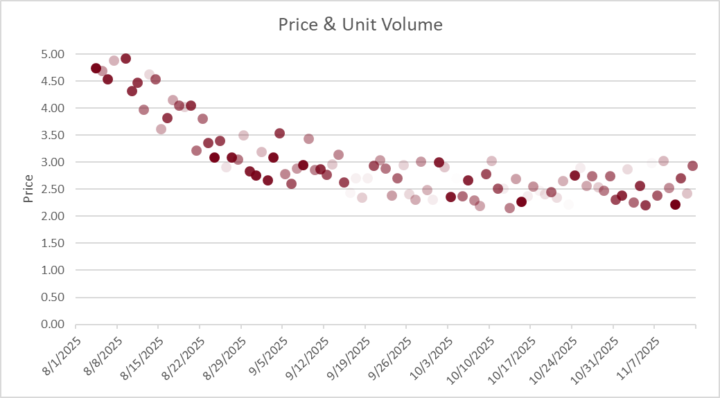
What Excel Creation from 2025 are you Proud of?
I know some of us do most things at work and may not be able to share a screenshot (myself included) but let's hear what are the amazing things you've created / done in Excel this year! I'll Start us off. ⬇️ _______________________________________________ I do a lot of work in forecasting and analysis and showing how a metric trends over time (like a product's price) is pretty standard. Line charts work, dot plots work also. But I also needed to show how many units were getting sold each of these days. You can overlay a bar chart, and that works, but visually communicating volume works great if each dot gets lighter with less volume. And that's what this chart does. Solid Dots have high volume. Very light dots have very little volume. Your eye immediately sees where volume is greatest, and has the biggest effect on results. I used this visual to help explain a hot-button issue and it immediately got shared with executives in multiple departments — big credibility booster. What's something you're proud of? — New Function You Learned — Process you improved — Challenge you Overcame
0 likes • Jan 10
@Tyler Lawtey You're in the right place! Is there something specific you'd like to improve on?

Dec '25 •
Looking to Level Up
I run a bookkeeping firm and I am looking to level up my meager excel skills.
0 likes • Dec '25
sometimes you gotta do that...
Dec '25 •
Hi Delon!
OK @Delon Canterbury , you got me. you describe yourself as a De-Prescribing Pharmacist. Please tell us more and what role does Excel play to help you in what you do?

1-10 of 47

@aaron-greeno-8926
Analytical Troublemaker
Semi-Certified Excel Nerd
Active 31d ago
Joined Nov 18, 2024
ENTJ
Nashville, TN
Powered by