
Write something
Pinned

Feb 12 •
Mission: Deliver a Report (Part 1) 🚀
Thanks for hanging out, everyone! Time to make it worth the wait. ⏳ I started a business a little while back—I don’t think that’s been covered yet. You guys can let me know if we should discuss that! 💼 I won't give away intimate details for obvious business reasons, but here’s what I can tell you: my business partner and I recently created an application that generates a report in JSON. 📄 I built the app in n8n and I'm using a couple of AI agents to generate the report based on the data provided to them. 🤖 The next question is: how do we get the report out of n8n and to the person who needs it? 🤔 The Workflow ⚙️ First, it’s important to know that a lot of what we do happens within the GoHighLevel (GHL) platform. * We receive data via a form that sends a request to our webhook in n8n. * We receive a binary file that I convert to JSON. * I use that JSON, along with some other data, to generate the final report. The Easy Road 🛣️ The easiest way to deliver the report is via email. GHL’s API makes me feel confident that I’ll be able to send an email using a template we created in the platform and simply attach the report. 📧 I’ve been getting more into the habit of using AI. The Google Workspace I pay for comes with Gemini, so I use that a lot. I took the JSON report and fed it into Gemini with a prompt to analyze the schema and write JavaScript that converts JSON to HTML. 💻 Gemini gave me the code, which I dropped into a Code Node in n8n. It took a few tweaks, but it was super easy! I don’t even write JavaScript, yet I was able to get this done in a few minutes. The result was a bunch of HTML that looks AMAZING when rendered. ✨ I used another node to convert that HTML into a PDF, so now the report is ready to be attached! Once I finish the email template, I’ll be able to test the delivery. 📎 The Hard Road 🧗 The "hard" road involves delivering reports directly to a user account with a dashboard. We’re going to cover this in future parts! 🏗️ If there’s anything in this post that you want me to expound on, let me know in the comments! This was just to get everyone engaged—this is going to lead to some very technical, hands-on project work that I hope everyone joins in on. 🛠️

25d •
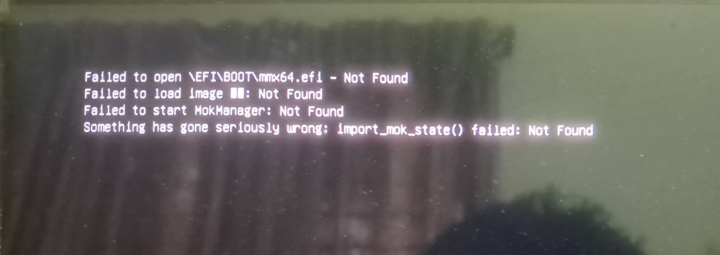
How to fix this error?
Been getting this error in the last few days trying to install Linux mInt
Feb 23 •
Open Collaboration
I would love to see more open conversations and collaborations. Yes, we are all here to learn more about Linux, but let's be honest, that's in the service of some goal more often than not. Success is a team sport until it's not. I encourage everyone here to network and maybe even team up on a project. Do you offer a service? Do you have some unique skill that could help someone here? Let's speak up and get things moving. We're all the early members here and that's going to come with strong perks long term. Let's get more active.

Feb 16 •
DOCs intro, working to be great.
Hello everyone, I'm relatively new to Linux and want to move around the command line like a pro. I hope to master this here in this space. I have an LPI Linux Essentials certification, but I hope to achieve more in due time. Thanks for having me!!
Aug '25 •
⚙️ Linux Tip of the Day: The Hosts File
The /etc/hosts file is a fundamental system file that plays a key role in how your Linux machine resolves domain names to IP addresses. It's essentially a local, manually managed DNS table. When you type a hostname like www.google.com into your browser, your system first checks /etc/hosts to see if there's a corresponding IP address listed there before sending a query to an external DNS server. This local check makes resolution extremely fast since no network communication is required. 🎯 Primary Uses * Blocking Websites: This is a common use for parents or system administrators. By mapping a domain to your local machine's loopback address (127.0.0.1), you can effectively prevent access to a site. For example, adding 127.0.0.1 twitter.com will block access to Twitter on your machine. * Local Development: Developers use the hosts file to test web applications before they go live on a public server. By adding an entry like 192.168.1.10 myapp.local, they can access their development server using a user-friendly hostname instead of an IP address. This mimics a live environment. * Network Shortcuts: You can create simple, memorable hostnames for devices on your local network. Instead of remembering 192.168.1.50 for your network printer, you could add 192.168.1.50 printer to your hosts file and simply type printer into your browser or command line to access it. ✍️ Editing the File The /etc/hosts file requires root permissions to edit. You can use a text editor like nano or vim with the sudo command. A good practice is to always back up the original file before making any changes. * Backup: sudo cp /etc/hosts /etc/hosts.bak * Edit: sudo nano /etc/hosts * Add your entries: Add new lines with the format IP_address hostname. * Save and Exit: Press Ctrl+O to save and Ctrl+X to exit in nano. After editing and saving, the changes take effect immediately without needing to restart any services. 🛡️ Important Notes * Comments: Lines starting with a # are ignored by the system and can be used to add comments for clarity. For example, # Blocked for security.
1-30 of 32
powered by

skool.com/linux-infrastructure-academy-5525
Master Linux infrastructure and DevOps skills with hands-on labs, tools, and community support. Build smarter, faster, and more secure systems.
Suggested communities
Powered by