Activity
Mon
Wed
Fri
Sun
Jul
Aug
Sep
Oct
Nov
Dec
Jan
Feb
Mar
Apr
May
Jun
What is this?
Less
More
Owned by Rob
Beginner-friendly community to learn Python, HTML, CSS, & JavaScript. We help you become a full-stack developer and offer 1:1 code coaching.
Share your crafting rooms and designs. Learn how to use cutting software, Sure Cuts a Lot, and Cricut Design Space. All Creators are Welcomed!
Memberships
Skoot | CRM for skool
616 members • $99/month
AI Online Educators & Coaches
2.7k members • Free
GOOSIFY: Skool Made Fun
13k members • Free
Skool Add-ons
981 members • Free
Hackathon
2.7k members • Free
Web Developers
781 members • Free
Crafty Cafe | Cricut Community
2.4k members • Free
the skool CLASSIFIEDS
1.9k members • Free
Vibe Coding School
775 members • Free
355 contributions to The Code Zone Skool

3d •
Python Test files
I am currently using a website called OpenClassRooms.com and they have exercises that you can do after each lesson. I am having a difficult time using the Python test files that they have created. I have attached a Word file and a text file with more details (commands, code, etc) of the process I have to go through in order to use the Python test files from the OpenClassRooms website. I would very much appreciate any advice, tips, and recommendations. Because it is currently quite a hassle for me just to be able to use their Python test files. 😒

🔥
1 like • 2h
I’ll take a look at these later today. I know @Tyler Michl loves python.
🔥
4h •
HTML Tip: You can create a simple popover without JavaScript.
A popover is like a small dropdown or popup that appears when the user clicks a button. This can be useful for menus, extra details, profile links, settings, and more. In this example: 1. The button has popovertarget="menu". That tells the browser which popover to open. The value "menu" matches the id of the popover. 2. The <div> has id="menu" and the popover attribute. The id="menu" connects it to the button. The popover attribute tells the browser, “This element should behave like a popover.” The cool part is that the browser handles opening and closing it for you. This is a great reminder that HTML can do more than just structure a page. Sometimes it gives us built-in features that save us from writing extra JavaScript. CodePen Example: https://codepen.io/precodecamp/pen/MYJpvOq
3
0

🔥
2d •
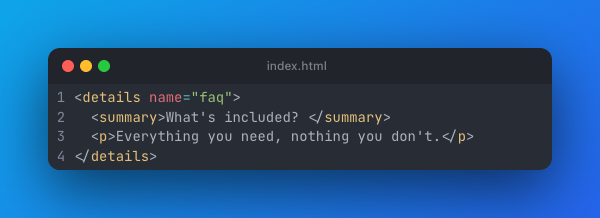
It's all in the <detail> & <summary>
Accordions and “read more” toggles with built-in keyboard support and zero JS. Add the open attribute to expand by default. Give several the same name, and they behave as an exclusive accordion. Test out the accordion with CodePen: https://codepen.io/precodecamp/pen/YPNNGKX
5
0
🔥
Oct '25 •
Welcome Everyone Introduce Yourself! 🥳
🚨 [Update: As you read some of these introductions, smash THEIR LIKE BUTTON 👍 Take it one step further by commenting on their introduction to earn bonus points and unlock more features in this group.]🚨 I am thankful to you all for joining this group. Could you please introduce yourself? Not only does this allow us to get to know everyone, but SKOOL is built on points. (Liking, Commenting, and Posting all give you points). Points will also unlock classroom courses for you! Check out the Getting Started Welcome Course: https://swiy.co/getting-started So let's get things started! When I was teaching in the classroom, we would go around the room and have you do the following. 1. State Your Name (Skool does this one for us - lol) 2. What had you been interested in learning to code? 3. What is your favorite potato? Me: What sparked my interest was my enjoyment of problem-solving and making life easier for myself. I wanted to learn how to create apps that could help my kids learn math and spelling, so I developed apps for that purpose. As far as a favorite potato. I would say Chick-fil-A fries. 🔥 As always, help this community grow. Skool gives you a special invite code. This also serves as your affiliate code, as being part of this group gives you the ability to earn a 40% commission. This applies to one-time purchases of courses or our premium membership.
Poll
60 members have voted
🔥
2 likes • 4d
A new flood of people came in and wanted to welcome them to the group: @Ourania Evagorou @Habiba Hayat @Raymon Köster @Christopher Simpson @Savi Young @Jefferson Miranda @Amy Kendall @Hana Maya Sul @Amber Charles @Blossom EverHart @Jerry Chavez What brings you to "The Code Zone" group?
🔥
3 likes • 2d
Welcome new members! What tech stack are you working with or learning? @Peter Chiwale @Abdurehman Akhtar @Aditya Bisht @Jack Banda @Christophe Van Hoof

4d •
HTML
Hi, i just have completed learning html. I can make the clones of webs and sign up pages and many more I will be happy if you guys give me any projects idea to make.
🔥
0 likes • 2d
One of the HTML projects that we used to do for the classroom was to pick from a list of API's and create a single page around it. Like a weather page based on your browser's location, show the temp and 5-day forecast. Or display the characters from Rick and Morty from their API. It's one thing to clone a site but another thing to showcase a static page with some API data.
1-10 of 355

🔥
@rob-vanarsdall-4466
Former US Army Aviator (flew Apache Helicopters) and turned Software Developer (I fly a desk). Now I coach people to become full-stack developers.
Active 2h ago
Joined Oct 6, 2025
Indianapolis, Indiana
Powered by