Activity
Mon
Wed
Fri
Sun
Aug
Sep
Oct
Nov
Dec
Jan
Feb
Mar
Apr
May
Jun
Jul
What is this?
Less
More
Owned by Bree
The implementation gap stops here. AI, digital income streams, and an ADHD solopreneur community that gets it. GET SHIT DONE. Become a Builder 🛠️ 😎
Memberships
LOW-ENERGY INCOME SYSTEMS
50 members • Free
Skoolers
167.1k members • Free
2 contributions to Skool Extensions 🧩

🔥
4d •
MCP Connector — Persistent no_skool_cookie_synced Error
I keep getting a cookie sync error when I try to use the MCP Connector in Claude. This has persisted across multiple sessions. Can you tell me specifically what "enable cookie sync" requires on my end — is there a setting I'm missing in the extension, or is this a known sync issue on your side?
🔥
2 likes • 4d
@Marco Berlin That worked! Thank you!

🔥
May 21 •
Community Pins
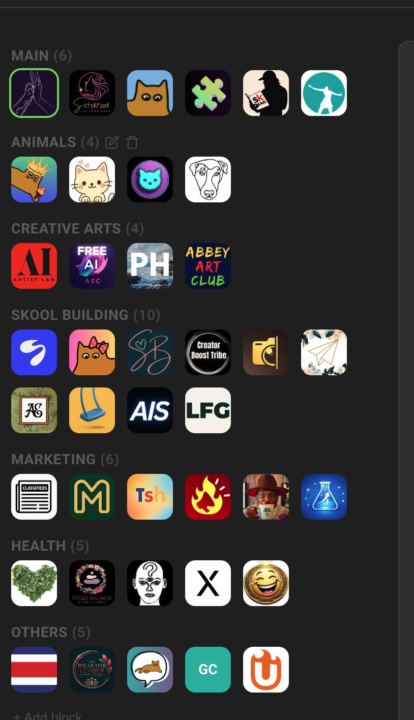
Replace Skool's left community switcher with a strip that holds every community you belong to, grouped into named blocks Skool's left sidebar only surfaces a handful of communities at a time — the rest sit behind a switcher dropdown you have to open every time. If you're active in a dozen or more, the ones you visit daily end up buried in a list you keep scrolling through. Community Pins replaces that switcher with a redesigned strip down the left edge that shows every community you belong to at once — your logos flow in rows across the space beside the page instead of one cramped column. Hover any community to see its name in a tooltip, and the one you're currently in is marked. Group your communities into named blocks. Add a block, head it "AI", "Clients", or whatever fits — each heading carries a live count of how many sit inside. A permanent "Pinned" block catches every community on its own: join a new one and it lands there, leave one and it drops out. Manage it all inline in the strip — "+ Block" adds one, the pencil renames a heading, and the trash icon removes a block (after a quick confirm) and drops its communities back into "Pinned". The "Pinned" block itself can be renamed but never deleted. Drag to organize. Reorder communities inside a block, pull one across to another block, or grab a block's heading to move whole blocks up and down. A custom mouse-driven drag tracks your cursor one-to-one, with no HTML5 ghost image or forbidden-drop flicker to get in the way. The strip scrolls quietly once the list grows long — a slim green scrollbar appears on hover and stays hidden otherwise, so the sidebar stays calm at rest. The whole arrangement is cloud-synced: lay your blocks out on one device and they show up the same on the next. Community Pins can be toggled in the Extension Settings under Appearance. --- Skools linken Community-Switcher durch einen Streifen ersetzen, der jede Community enthält, in der du bist, in benannten Blöcken organisiert Skools linke Sidebar zeigt immer nur eine Handvoll Communities auf einmal — der Rest steckt hinter einem Switcher-Dropdown, das du jedes Mal aufklappen musst. Wenn du in einem Dutzend oder mehr aktiv bist, sind die täglich besuchten in einer Liste vergraben, durch die du immer wieder scrollst.
🔥
1 like • 7d
@Marco Berlin thank you! This feature is so helpful for me. I won't say how many communities I'm in, but it's so many that I know what the pin limit is even with the extension 😂🤦🏽♀️.
🔥
1 like • 5d
Thank you so much for the extra pins! 🤗
1-2 of 2

🔥
@bree-wood
Community Experience Architect. Founder of Digital Biz HQ | Closing the Implementation Gap for ADHD Solopreneurs
Active 48m ago
Joined Jun 27, 2026
INTJ
Michigan
Powered by