Activity
Mon
Wed
Fri
Sun
Dec
Jan
Feb
Mar
Apr
May
Jun
Jul
Aug
Sep
Oct
What is this?
Less
More
Owned by Daniel
Lerne wie Du mit GrokBot KI-Mitarbeitern Zeit sparst und mehr Geld verdienst.😎👍 GRATIS GrokBot Masterclass 🎁
Austausch über optimale Ernährung, Training, und Biohacking. 🎁 GRATIS Trainings & Ernährungsplan!
Library of Adonis
3k
5.0
$47/m
Self Improvement DE
228
4.9
$33/m
19 contributions to Skool Extensions 🧩

🔥
6d •
Members Near You
𝗠𝗲𝗺𝗯𝗲𝗿𝘀 𝗡𝗲𝗮𝗿 𝗬𝗼𝘂 — 𝗦𝗲𝗲 𝗪𝗵𝗼 𝗟𝗶𝘃𝗲𝘀 𝗔𝗿𝗼𝘂𝗻𝗱 𝘁𝗵𝗲 𝗖𝗼𝗿𝗻𝗲𝗿 Skool tells you how many members a community has, but not who among them lives near you. Members Near You adds a tile below the community card on every community page: the members whose profile location is close to yours, sorted by distance — "Köln · 357 km". Members from a neighbouring country show up too when they live within 300 km, with the country next to the city: "Copenhagen, Denmark · 289 km". Each row shows avatar, name with the usual member badges, place and distance, plus when the member was last active; a click opens the profile in a new tab with this community already selected, so the feed stays where you left it and a DM or a follow is one step away. The tile reads the location each member typed into their Skool profile — the same field Skool shows on the members page — and nothing else. Distances are worked out on your device from a built-in city list, measured between city centres; no map service ever sees a location. Members in a small town the list doesn't know still appear for your country, below the measured ones and without a km value. Members without a location simply don't appear, and if your own profile has none, the tile asks you to add it and links to your settings. Up to five members show in the tile; "Show all" expands it to the full list. If you run the community and keep its member list in the Members Panel, the tile uses that complete list right away. Everyone else sees what Skool shows a regular member: a snapshot of 30 members, the ones online right now first. The tile keeps everyone it has seen and looks again every few hours while you visit, so the list grows from visit to visit. As long as it knows fewer members than the community has, a footnote says so — "Based on 30 of 313 members". Locations rarely change, so members stay in the list for two months after they were last seen. Members Near You is on by default and can be toggled in the Extension Settings, right below Community Stats.


🔥
5 likes • 6d
spotted this one, it's great
🔥
Jul 2 •
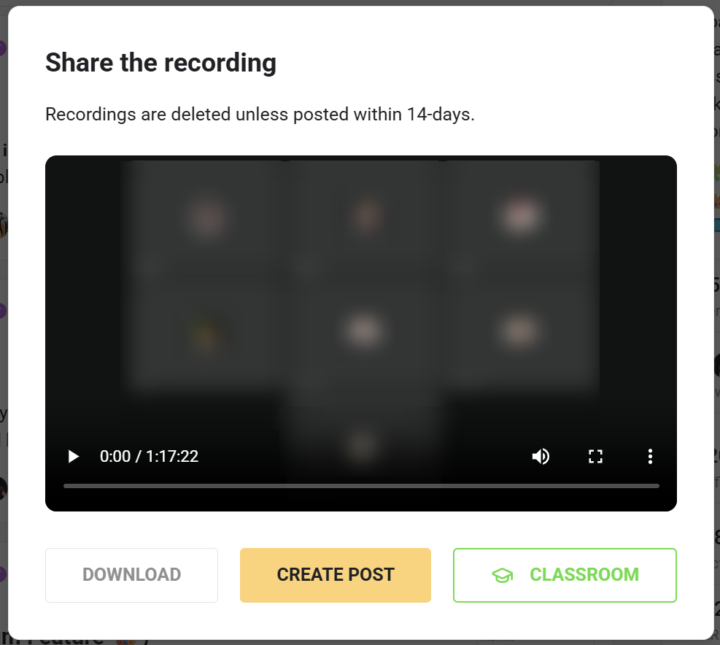
Recording → Classroom (VIP Feature 💎)
𝗥𝗲𝗰𝗼𝗿𝗱𝗶𝗻𝗴 𝗜𝗺𝗽𝗼𝗿𝘁 — 𝗧𝘂𝗿𝗻 𝗮 𝗟𝗶𝘃𝗲-𝗖𝗮𝗹𝗹 𝗥𝗲𝗰𝗼𝗿𝗱𝗶𝗻𝗴 𝗜𝗻𝘁𝗼 𝗮 𝗖𝗹𝗮𝘀𝘀𝗿𝗼𝗼𝗺 𝗟𝗲𝘀𝘀𝗼𝗻 A great live call ends up as a recording, and the usual way to reuse it means downloading the file and uploading it again as a classroom lesson by hand. Recording Import skips all of that: after a live call, community admins and owners get an "Add to classroom" button right in Skool's recording dialog, and one click turns the recording into a lesson without ever leaving Skool. You pick where it lands — the target community (any one where you're a native admin or owner), then either a new lesson inside a module or an existing classroom page — and give the lesson its title. A live progress strip walks the import through each step, from queued to downloading, uploading to Skool, processing and finally creating the lesson. Because the work runs server-side, you can close the window whenever you like — the import keeps going in the background and finishes on its own. Recording Import is toggled from the "Recording → Classroom" switch in the Live Call section of the Extension Settings. Turning it on asks for consent to sync your Skool session so the upload can run server-side. VIP-gated, and the button only appears for communities where you're a native admin or owner. --- 𝗥𝗲𝗰𝗼𝗿𝗱𝗶𝗻𝗴-𝗜𝗺𝗽𝗼𝗿𝘁 — 𝗘𝗶𝗻𝗲 𝗟𝗶𝘃𝗲-𝗖𝗮𝗹𝗹-𝗔𝘂𝗳𝘇𝗲𝗶𝗰𝗵𝗻𝘂𝗻𝗴 𝗶𝗻 𝗲𝗶𝗻𝗲 𝗖𝗹𝗮𝘀𝘀𝗿𝗼𝗼𝗺-𝗟𝗲𝗸𝘁𝗶𝗼𝗻 𝘃𝗲𝗿𝘄𝗮𝗻𝗱𝗲𝗹𝗻 Ein guter Live-Call landet als Aufzeichnung, und der übliche Weg, sie weiterzuverwenden, heißt: Datei herunterladen und von Hand wieder als Classroom-Lektion hochladen. Recording-Import spart dir das komplett: Nach einem Live-Call bekommen Community-Admins und Owner direkt in Skools Aufzeichnungs-Dialog einen „Zum Classroom hinzufügen"-Button, und ein Klick macht aus der Aufzeichnung eine Lektion, ohne Skool je zu verlassen. Du wählst, wo sie landet — die Ziel-Community (jede, in der du nativ Admin oder Owner bist), dann entweder eine neue Lektion in einem Modul oder eine bestehende Classroom-Seite — und gibst der Lektion ihren Titel. Ein Live-Fortschritt begleitet den Import durch jeden Schritt, von der Warteschlange über Download, Upload zu Skool und Verarbeitung bis zum Anlegen der Lektion. Weil die Arbeit serverseitig läuft, kannst du das Fenster jederzeit schließen — der Import läuft im Hintergrund weiter und wird von selbst fertig.
🔥
2 likes • 29d
love it
🔥
Sep 29 •
Translation & Spell Check (free)
𝗧𝗿𝗮𝗻𝘀𝗹𝗮𝘁𝗶𝗼𝗻 & 𝗦𝗽𝗲𝗹𝗹 𝗖𝗵𝗲𝗰𝗸 — 𝗖𝗵𝗲𝗰𝗸 𝘆𝗼𝘂𝗿 𝘁𝗲𝘅𝘁 𝗯𝗲𝗳𝗼𝗿𝗲 𝘆𝗼𝘂 𝘀𝗲𝗻𝗱 𝗶𝘁 Typos slip into every post, and writing in a language that isn't your own makes it worse. Translation & Spell Check puts one language button into the post and comment window: it checks your draft's spelling, and in communities you have translated it also translates your draft into the community's language. With both available, the button opens a small menu — "Translate" or "Check spelling". The spell check marks each mistake with suggestions. Click a suggestion to apply it, or "Ignore" to skip the spot. "Apply clear fixes" takes every mistake that has exactly one suggestion in one go. The check runs on LanguageTool and handles up to 20,000 characters at a time. Chats get the same tool. In DMs, in Group Chat and in Skool's own DM window, one button translates your draft into your partner's language or checks its spelling — hover it and the small badge switches between the two modes. The partner's language comes from the CRM or is detected from the conversation. Both parts have their own switch named "Translation & spell check" — one among the post features, one in the chat settings. Automatic translation of community content stays a separate setting ("Translate community content"). Translation and spell check send text directly from your browser to Google Translate and LanguageTool. You're asked for consent once, on your first click; until then you see everything in the original. You can review or revoke it under "Data processing". --- 𝗨̈𝗯𝗲𝗿𝘀𝗲𝘁𝘇𝘂𝗻𝗴 & 𝗥𝗲𝗰𝗵𝘁𝘀𝗰𝗵𝗿𝗲𝗶𝗯𝗽𝗿𝘂̈𝗳𝘂𝗻𝗴 — 𝗧𝗲𝘅𝘁 𝗽𝗿𝘂̈𝗳𝗲𝗻, 𝗯𝗲𝘃𝗼𝗿 𝗲𝗿 𝗿𝗮𝘂𝘀𝗴𝗲𝗵𝘁 In jeden Post schleichen sich Tippfehler, und wer nicht in der eigenen Sprache schreibt, hat es noch schwerer. Übersetzung & Rechtschreibprüfung setzt einen Sprach-Button ins Post- und Kommentarfenster: Er prüft die Rechtschreibung deines Entwurfs und übersetzt ihn in Communities, die du übersetzen lässt, auch in deren Sprache. Ist beides verfügbar, öffnet der Button ein kleines Menü — „Übersetzen" oder „Rechtschreibung prüfen".

🔥
4 likes • Sep 29
nice
🔥
Sep 24 •
1000 members 🥳🥳🥳
I love improving our daily Skool game. Let's make Skool even better and more individual together. A big thank you. A small well-known game is coming with the next update 🐍 (Edition 1000)

🔥
5 likes • Sep 24
Herzlichen Glückwunsch! So ein cooles Tool :)
🔥
4 likes • Sep 24
@Ares Empfehlungsmeister zu viel gibt's nicht haha

Sep 21 •
Hilfe bitte
Hey was hab ich falsch gemacht? plötzlich sind alle Profil-Bilder verschwommen, keine Ahnung wo ich mich da verdrückt hab kann mir bitte jemand helfen? hab Brave Browser (Chrome Prinzip) und bei den Ext. wohl irgendwas irrtümlich verstellt 🤷🏽

🔥
2 likes • Sep 22
ah ok, hast gefunden nice
1-10 of 19

🔥
@daniel-spitzwieser
süchtig nach GrokBot, Gym, und Skool
Active 5m ago
Joined Sep 9, 2026
Salzburg/München
Powered by