Activity
Mon
Wed
Fri
Sun
Aug
Sep
Oct
Nov
Dec
Jan
Feb
Mar
Apr
May
Jun
Jul
What is this?
Less
More
Memberships
Baddie Creator Era: AI Content
616 members • Free
DIGITAL PROFITS COLLECTIVE
1.9k members • Free
The Ace Method
566 members • Free
REVENUE REVOLUTION
10.4k members • Free
GenX Creator Lab
770 members • Free
Mom Content Club
278 members • Free
She Builds Anyway
105 members • Free
She Stacks Wealth™
1k members • Free
The Digital Income Edit™
846 members • Free
3 contributions to Skool Extensions 🧩

15d •
Install on Mobile
Hi. How do I install on my cell phone, I'm using the Skool app. I clicked the link. It showed me that I installed it on my desktop, which I did. Do I need to uninstall the app and reinstall? TIA
1 like • 15d
@Marco Berlin can you asnwer this? I use my phone primarily and would love to be able to bookmark posts from my phone.
2 likes • 15d
@Marco Berlin ok thank you

🔥
Mar 10 •
🧩 Skool Extensions starting
skool-extensions.com I’m officially releasing my Skool Extensions! 🥳 Install the extension, give me your feedback and ideas, and spread the word! --- Hiermit veröffentliche ich offiziell meine Skool Chrome Extension 🥳 Installier dir die Extension, geb mir Feedback und Ideen und erzählt es weiter.

2 likes • 15d
@Kimberly Armatys I'd have to say bookmarks. How about you?
1 like • 15d
@Kimberly Armatys oh I love this!
🔥
Mar 13 •
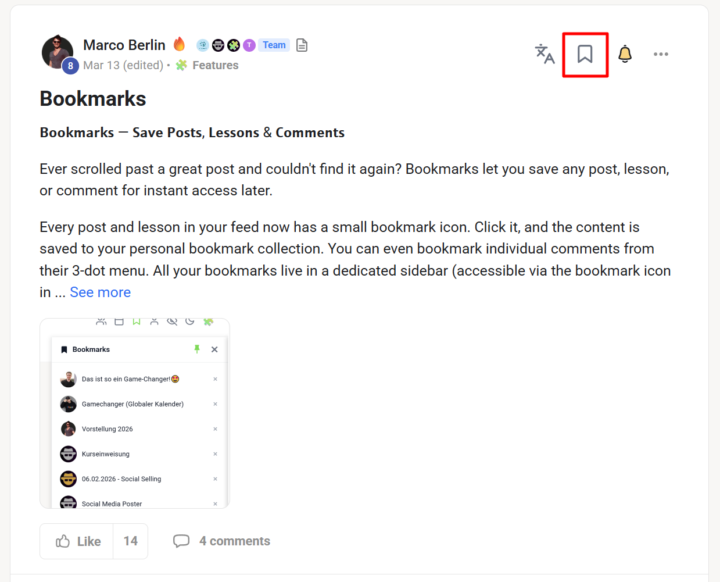
Bookmarks
𝗕𝗼𝗼𝗸𝗺𝗮𝗿𝗸𝘀 — 𝗦𝗮𝘃𝗲 𝗣𝗼𝘀𝘁𝘀, 𝗟𝗲𝘀𝘀𝗼𝗻𝘀 & 𝗖𝗼𝗺𝗺𝗲𝗻𝘁𝘀 Ever scrolled past a great post and couldn't find it again? Bookmarks let you save any post, lesson, or comment for instant access later. Every post and lesson in your feed now has a small bookmark icon. Click it, and the content is saved to your personal bookmark collection. You can even bookmark individual comments from their 3-dot menu. All your bookmarks live in a dedicated sidebar (accessible via the bookmark icon in the top navbar) where you can see them at a glance — complete with the author's avatar and post title. Want to reorganize? Just drag and drop bookmarks to reorder them however you like. Click any bookmark to jump straight to that content. Need to clean up? Hit the small "×" to remove entries you no longer need. Your bookmarks persist across sessions, so they're always there when you come back. --- 𝗟𝗲𝘀𝗲𝘇𝗲𝗶𝗰𝗵𝗲𝗻 — 𝗣𝗼𝘀𝘁𝘀, 𝗟𝗲𝗸𝘁𝗶𝗼𝗻𝗲𝗻 & 𝗞𝗼𝗺𝗺𝗲𝗻𝘁𝗮𝗿𝗲 𝘀𝗽𝗲𝗶𝗰𝗵𝗲𝗿𝗻 Schon mal an einem tollen Post vorbei gescrollt und ihn nicht mehr wiedergefunden? Lesezeichen lassen dich jeden Post, jede Lektion und jeden Kommentar für sofortigen Zugriff speichern. Jeder Post und jede Lektion in deinem Feed hat jetzt ein kleines Lesezeichen-Icon. Klick darauf, und der Inhalt wird in deiner persönlichen Lesezeichen-Sammlung gespeichert. Du kannst sogar einzelne Kommentare über deren 3-Punkte-Menü bookmarken. Alle deine Lesezeichen leben in einer eigenen Sidebar (erreichbar über das Lesezeichen-Icon in der oberen Navbar), wo du sie auf einen Blick sehen kannst — komplett mit Autor-Avatar und Post-Titel. Willst du umsortieren? Ziehe Lesezeichen einfach per Drag & Drop in die gewünschte Reihenfolge. Klick auf ein Lesezeichen, um direkt zum Inhalt zu springen. Aufräumen? Klick das kleine "×", um Einträge zu entfernen, die du nicht mehr brauchst. Deine Lesezeichen bleiben über Sessions hinweg gespeichert — sie sind immer da, wenn du wiederkommst.
1 like • 16d
So how do I get the ability to create a bookmark?
1 like • 16d
@Marco Berlin I don't have that option. I realized that I should have read the pinned post to install these extensions.
1-3 of 3
Active 3m ago
Joined Jun 17, 2026
Powered by